
 Home
 User Guide
 Developers
 Payment Gateways
 Integrations & Tools
 Site Usage
 Troubleshooting
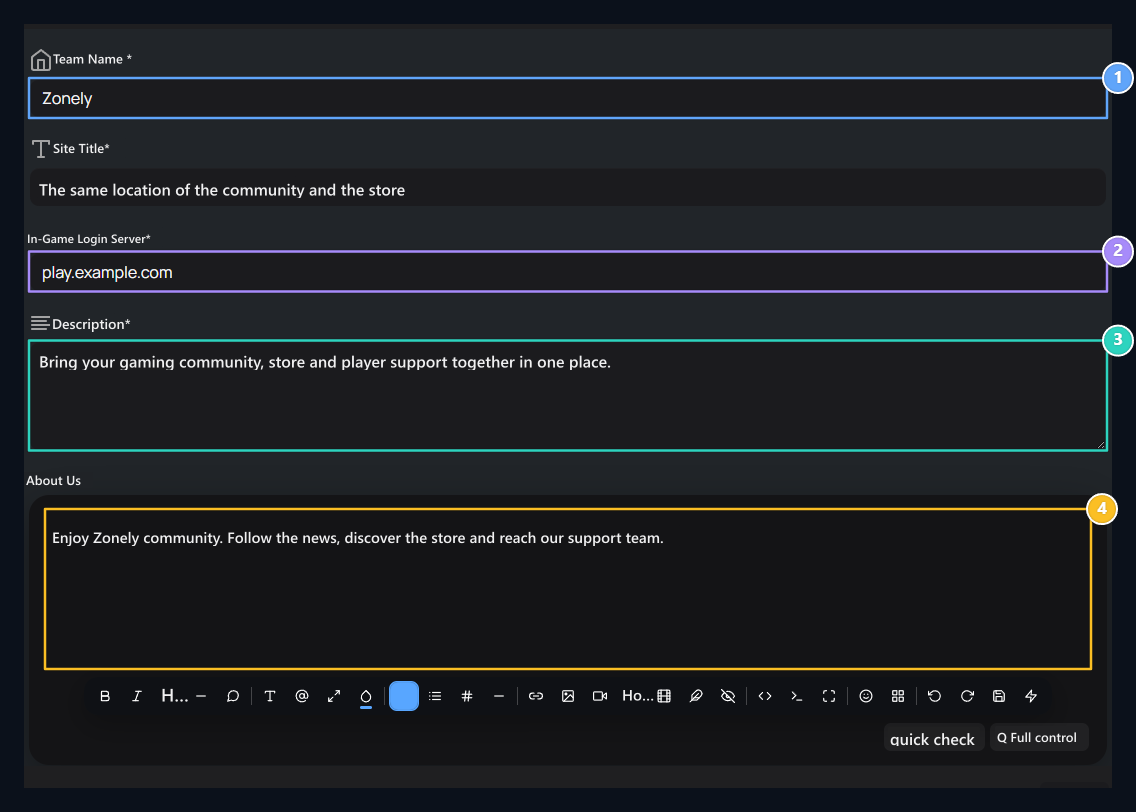
1. Team name and brand
Write the community or brand name to be used on your site.
2. Game server
Enter the address to connect players; this area does not add new servers.
3. Short description
Briefly promote the site within the 155 character limit.
4. About Us
Prepare with longer promotional headers, lists and links.
Type site name and header
Team Nameis the community or brand name to be used on your site. Site Titleis a short title or slogan that completes this name. For example, the team name can be “Zonely”, the title “The same place of the store and the store”. You fill two different fields from each other: type your brand, head to the visitor what you offer. Check out how a long header looks at narrow screens.Enter the game server address
In-Game Login Server type the address to the players to connect to the field. For exampleplay.example.com You can use it. Change the address to show on your site with the real link information of your own server.
Filling this space does not create a server connection for command delivery. Server connections and in-game operations Servers Configure the section.
Prepare a brief description
Description Area 155 characters takes. Tell your site’s purpose with a short sentence. For example, you can write a text like “Create game community, store and player support in one place.” SEO description used for search and social sharing is a separate area. Her SEO and social media Edit in the section.Edit text about us
About usThe content area that you can tell your community longer. Explain game modes with separate paragraphs of what players can do and support ways. You can edit text with header, list, link and visual tools.Content Editor
Check the steps of text formatting, image enlargement, link and media inserting.