
 Home
 User Guide
 Developers
 Payment Gateways
 Integrations & Tools
 Site Usage
 Troubleshooting
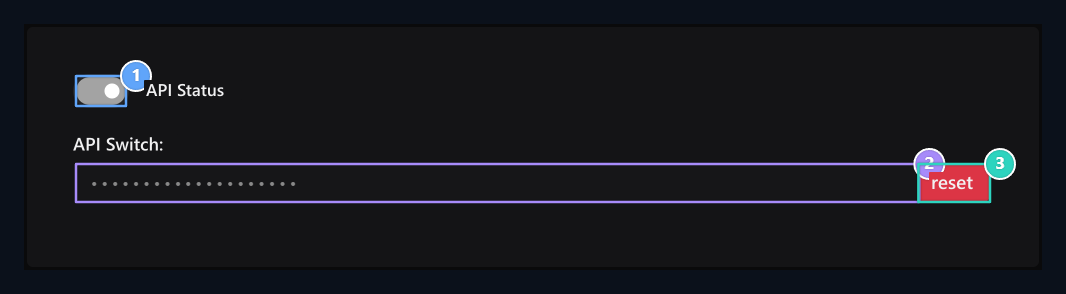
1. API Status
Manage API access with this option.
2. API Switch
Get the key to use in the app you connect from this area.
3. Reset
Update the value in the connected apps when you renew the key.
Set API access
API Status Open or close access with option. Check that the processing you will use this option before connecting is in the appropriate case.Add to your key app
API Key enter the value in the authorization field of the application that you will connect. The key is hidden in the visual; use the value on your own screen for your connection. The request method and the necessary areas vary depending on the processing you will call. Installation from developer overview Start; take the areas of the process you will use from the own document.Refresh the key when required
Reset You can create new keys with the button. After renewing, update the link information on applications that use old value.Anahtarı yalnız bağlantı kuracağınız uygulamada kullanın. Herkese açık sayfalara veya istemci koduna eklemeyin.
Prepare the relevant link
API scope
Check out the trading groups you can use.
webhooks
Prepare notifications for realizing events.