
 Home
 User Guide
 Developers
 Payment Gateways
 Integrations & Tools
 Site Usage
 Troubleshooting
Select the section first
Addons, available packages; Uploadedshows installed plugins. tools Check out additional tools available on this section. Numbers in lists vary according to your installation.
1. Add-ons
View available plugins.
2. Uploaded
Open the board plugins and the set options.
3. Tools
Check out additional tools available in this section.
Open the settings of the plugin
Uploaded Find the plugin on the relevant tab. Options → Layout the process opens the self-setting screen of the plugin.
1. Options
Open the trading menu of the plugin you choose.
2. Edit
Open the setting screen of the plugin.
Upload ZIP package
If you have a plugin package on your computer Upload ZIP Press the button. Select ZIP file from the window that opens and complete the installation step on the screen.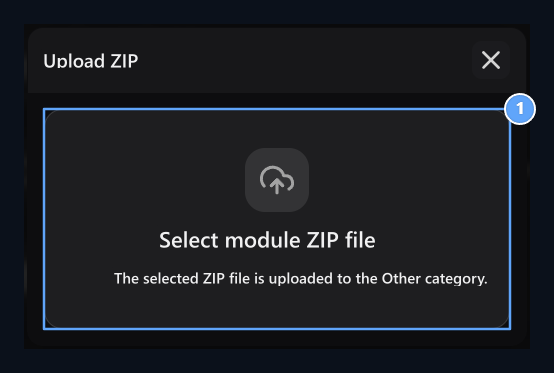
1. ZIP file
Select the add-on package from your computer.
Go to the guide of the property
Find the plugin from the category. If the card is told in another section, it will take you directly to that guide.Support · 3 add-ons
Support · 3 add-ons

Live Support
Manage your request list, calls and authorized responses.
Visitor Support
Open the visitor call and use the support window on the site.
Support AI Assistant
Activate the support assistant, prepare information sources and review how user call is.
Trade · 11 add-ons
Trade · 11 add-ons
Tebex Store
Prepare the Tebex Store connection and store mapping.
Shopier OSB
Set out the store link outside with Shopier store.
Product Transport
Select the appropriate order, find the buyer account and move the unused product to another user.
Product Upgrade
Compare the upper package, check the price difference and complete the upgrade through the balance summary.
Product Packaging
Pack multiple products; set content and sales price.
Loading Credit
Select the amount and payment method to be installed; review the payment summary and proceed to the balance loading flow.
Credit Submission
Select the buyer user and select the amount of credit to be sent from your own balance.
BirFatura
Enter the BirFatura connection token and save the integration information.
ParaÅüt
Enter application and company identifications; set the choice of verification type, related records and development.
Gold Bank
Connect winning methods and Discord tasks; prepare rewards to be taken in gold.
Advertising Manager
Prepare advertising space, category and package; manage user ads, approval, statistics and filters.
Security · 3 add-ons
Security · 3 add-ons
2-Step Verification
Open two-step verification on the profile and complete the personal installation with the code that the correcter application produces.
Content Protection
Find content protection record and manage the preferred content interaction theme has to offer.
DMCA
Show the DMCA badge on the footer and check the link that the badge is redirected.
Interactive · 6 add-ons
Interactive · 6 add-ons
Sweepstakes
Set the number and participation conditions of the awards, the number of awards, the draw and follow the results.
Bounty Hunt
Prepare the amount of the prize, the time to appear and the collection limits per user.
bets
Prepare the sides, proportions and amount limits of the countercommuneration; manage the deposition and distribution.
Scratch Card
Set the fee, rewards and reuse limits of the award card opened by digging.
Daily Chests
Prepare the fee, prize pool and history view of the chest that can be opened every 24 hours.
Mystery Boxes
Set the number of boxes, credit range and challenges; prepare the collection flow of rounds and winnings.
Game · 11 add-ons
Game · 11 add-ons
Cosmetics
View skin and cosmetic products of Hesaba, select the item to be used and check the selected status.
Inventory Viewer
Select the server on the user profile; review inventory, health, hunger and experience information.
Game Launcher
Prepare the server profile, colors and game versions of the launcher.
Report System
Check out pending reports; compare and decide chat evidence, commands and moderation history.
Minecraft AFK Bot
Select browser or API operating format; set service connection and start slot number.
tournaments
Find upcoming and past tournaments; review matches, scores and critic tree.
Choose and Win
Prepare the fee, prize weights and usage limits of the game selection from eight off cards.
Spin Win
Create the reward wheel; set the flip fee, result weights and usage limits.
safes
Prepare the case view, opening fee, prize pool and usage limits.
Minecraft Web Client
Join Minecraft 26.3 web client on the browser.
Roblox Account Login
Save client information of the Roblox app and match the redirect address on the panel with the app.
Content · 3 add-ons
Content · 3 add-ons
Videos
Match video and cover connections; add lines to the Team Videos list.
Downloads
Edit the name, description, visual and download link of the downloadable contents.
cursors
Add custom images to mouse situations; adjust cursor type, click point and activation.
System · 10 add-ons
System · 10 add-ons
Penalty Configuration
Select the system, AdvancedBan or LiteBans source and match with criminal records on the gaming server.
Notifications
Prepare in-site notice and follow the display.
Inbox
Find the latest conversations on the user account and open the interview from the subject link.
Mail Verification
Verify the email address of the account; if necessary, correct the address and ask for the new verification link.
Remember Me
Open the preference to remember in the form of the login and see how the user will do the choice of sessions.
Mail Determination Confirmation
Complete the contact information of the missing account and if necessary, proceed to the address verification.
Google Analytics
Enter the measurement ID of web data flow and save the Analytics link.
Cookie Consent
Open the cookie preferences of the visitor, select optional categories and save the choice.
Site Load Counter
Find the added time plugin and check the time display on the bottom of the theme.
Download App (PWA)
Open the site’s installation proposal and use the app inserting step of the supporting browser.
Marketing tools · 3 add-ons
Marketing tools · 3 add-ons
In-Game Marketing
Select the game type of store, prepare server connection and complete the game product delivery.
Digital Marketing
Use digital product, file update and license tools.
SMM Panel
Activate the SMM plugin, connect the provider and match the store product to the right service.
Discord Activity Widget
Discord Bot
Discord Webhook
Linked Accounts
Discord Matching
friends
Profile Pictures
General Chat
Discussions
Customer Reviews
Customer References
Social Media