
Route Filters open the screen. You can change or set the addresses used on the site or prepare redirects to another link in the local way you set.

Find page

Route group, Search, Add Route

1. Route group

Select the list of Themes or Management Routes.

2. Search

Describe the list by typing page name or route.

3. Add Route

Prepare special referral to another link.
Theme Routes site pages, Management Routes lists panel pages. Type the search page name or route. Current Route first address, Route Used indicates the current address. Line ⋯ İşlemler → Düzenle Open the option. Route Name name you will know in the field, New Route field / Type the way starting with. Save After applying with, check the link.

Protect parameters
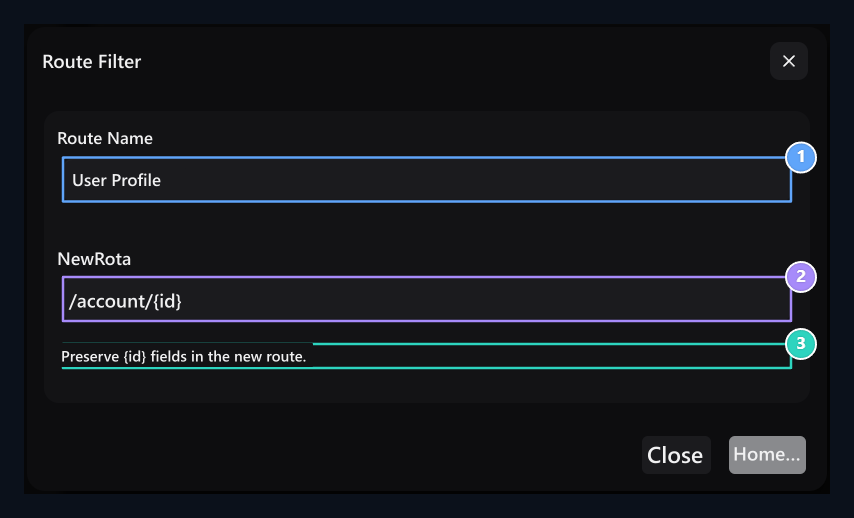
Route Name, New Route, Parameter info

1. Route Name

Type the name you will be notified in the list of the page.

2. New Route

Protect the id or slug parameter of the page at the new address.

3. Parameter information

Read the areas to be protected at this page.
Some addresses have parameter for user or product information. Protect the signs shown in the alert below the form at the new address. For example:
The user’s identity in the connection is replaced by the corresponding sign. Like slug or if there are other parameters, move them in the form shown in the form. The ready pages themselves cannot be deleted from the list; the address used can be edited.

Add custom redirect
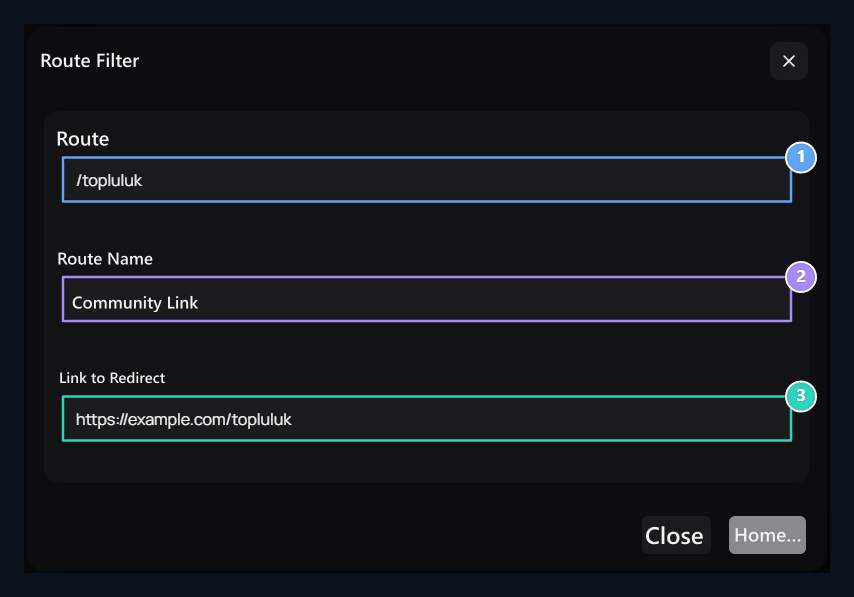
Route, Route Name, Routing goal

1. Route

Enter the local way the visitor will open on your site.

2. Route Name

Type the name you will be introduced in the list of the referral.

3. Routing goal

Type full HTTPS address to open for the Private Route.
Theme Routes When selected Add Route Press the button. Route the way to open the visitor on your site, Route Name name and name of registration in the field Directions to Connect enter the exact target address in the field. Sample /topluluk Way https://example.com/topluluk goes to the target. Write your own connection Save Press the button. From the corresponding line to remove private registration ⋯ İşlemler → Sil Use option.

Use page selection on menu

Menu, footer and store redirect Page Type When you select the page ready from the list, the link follows the route adjustment of the page. Fill out the pop-up space if additional information is asked like the user ID. Menu steps for Navbar and Footerfor the opening choice of the store Store Settings Go to the guide.
