
Outdated Templates open the screen. This list is for reviewing local templates with newer version in the core. To choose or modify the theme package Themes Use the part.

Find the pending file

Normal Template with site, AdminCP Template Select the scope of the management panel. The name and way of the file in the list, Kernel Update Date and Latest Local Template date appears. Find the file about the search. Site or panel, Update All Templates, Release dates
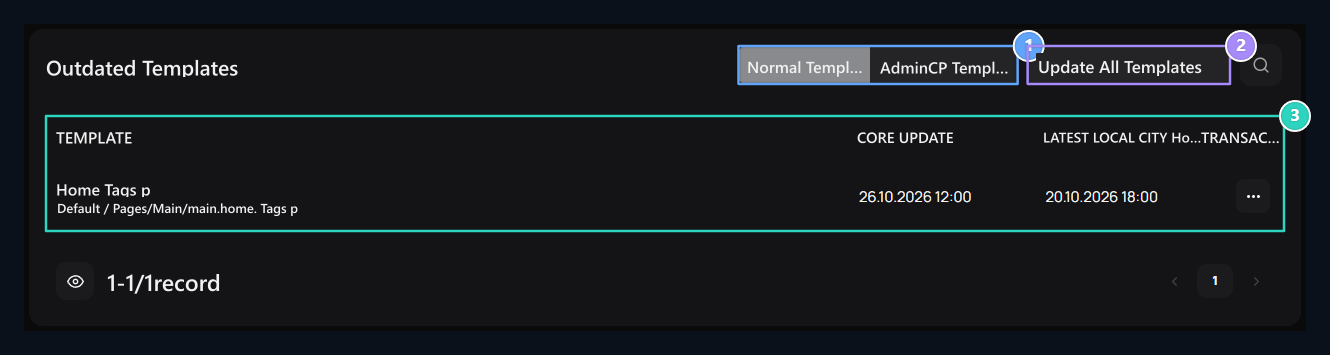
1. Site or panel

View the updated files in the relevant context.

2. Update All Templates

Use batch update after reviewing and backing up customizations.

3. Release dates

Core update and final local template dates are compared.

First view

Open the process of displaying the difference of the line. Check out the planted, removed and changing lines. Identify partitions to protect your own design and identify the copy of the existing file Templates Store from the editor. We will not update the file to view the difference. Dates help compare versions; also review how local customizations will combine with new source.

Update a template

Related Line Update Press the button. Check and complete the target file in the drop-down confirmation. Check the result message and the renewed list. Then open the page that the file has affected. For example, if the product template has changed, check the product detail and the process buttons, the announcement template has changed, the list and the font look. Review the parts that you need to protect your own content.

Update all templates in coverage

Update All TemplatesStarts the process under selected Normal Template or AdminCP. Before you examine the differences of files, get the necessary copies and verify the scope. If you are interested in a single file, you can use the Update process of the line. After the procedure, not only the result message, check the remaining records and affected pages. Partial After all, read the result and proceed to the files that are not completed. Template Changesshows local customizations and re-purchase. This screen focuses on updating old templates with new source version.