
 Home
 User Guide
 Developers
 Payment Gateways
 Integrations & Tools
 Site Usage
 Troubleshooting
Set the discount
Discount Status → Outdoor Select and Discount (%) Type the rate in the field. Select the date of finish if you will use the time limit; if you do not want limit Indefinitely Select. Products → All cover all products or Selected products Check products via.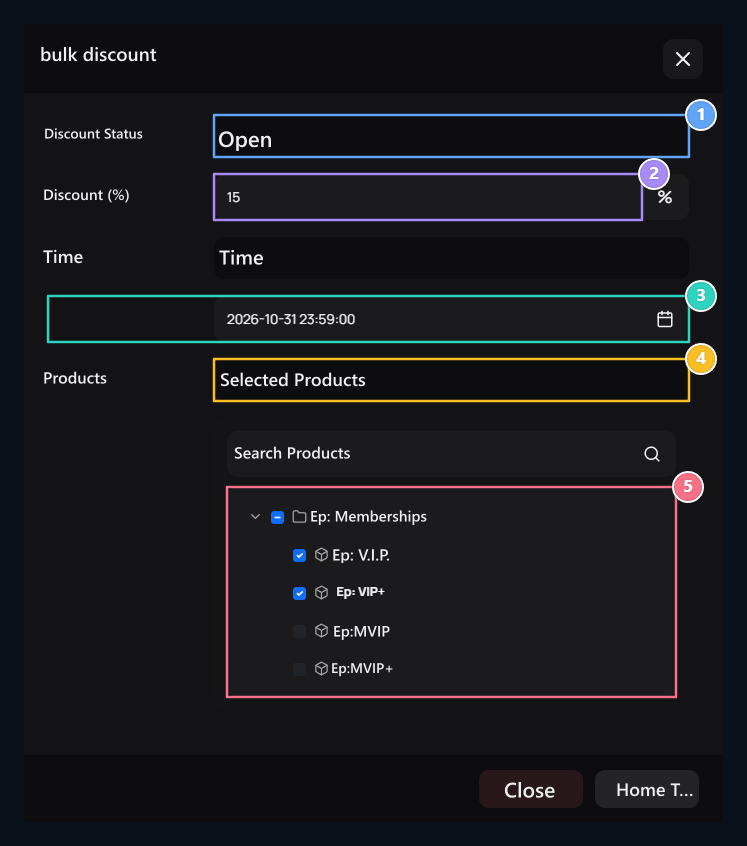
1. Discount status
When selected open, the rate, time and product scope areas are opened.
2. Discount rate
Type the discount rate to apply to the products you choose.
3. Discount time
Set the expiration date for periodic discounts.
4. Product scope
Set the discount coverage with all or Selected products.
5. Selected products
Check the products that the discount will be applied.