
 Home
 User Guide
 Developers
 Payment Gateways
 Integrations & Tools
 Site Usage
 Troubleshooting
Supported vote providers
The voting providers are sites that can list your server or community and increase visibility with users’ votes. You can prepare the reward for the voters verified by adding votes of these sites in Zonely.All supported providers (42)
All supported providers (42)
- topg.org
- minecraft-mp.com
- minecraft-server.net
- topminecraft.io
- topminecraft.click
- trackyserver.com
- serveurliste.com
- serveur-minecraft-vote.fr
- liste-serv-minecraft.fr
- serveurs-minecraft.org
- serveurs-mc.net
- serveur-minecraft.fr
- serveur-minecraft.com
- serveursminecraft.org
- liste-serveurs.fr
- minecraft-italia.net
- gamemonitoring.ru
- minecraft-server.eu
- minecraftpocket-servers.com
- discordtop.net
- hytale-servs.fr
- hytale-servers.best
- gmod-servers.com
- ark-servers.net
- rust-servers.net
- tf2-servers.com
- unturned-servers.net
- counter-strike-servers.net
- serveur-prive.net
- serveur-prive-impulsion.net
- top-serveurs.net
- serveur-hytale.gg
- top-games.net
- liste-serveurs-minecraft.org
- playbase.pro
- mctop.su
- topcraft.club
- hotmc.ru
- mineserv.top
- minecraftrating.ru
- gtop100.com
- xtremetop100.com
- arena-top100.com
Add site and vote link
Site Name and Description fill in the fields. Voting URL type the voting link that the provider has given for your server. Status You can prepare active or passive from the domain registration.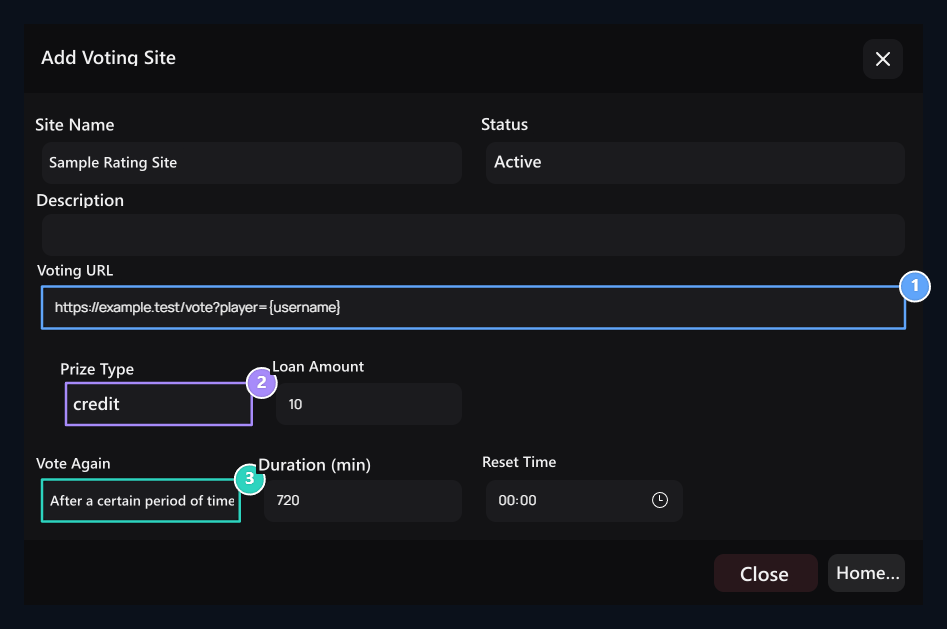
1. Votes URL
Use the link format of the real provider.
2. Reward type
Credit, Product or Command.
3. Re- votes
Select time or daily reset.
Select the Rate
Prize Type Select credit, product or command from the list. Complete the areas opened according to the type.
Command type Add Server Select delivery destination with. Fill the command and description lines; add other commands or servers if necessary.
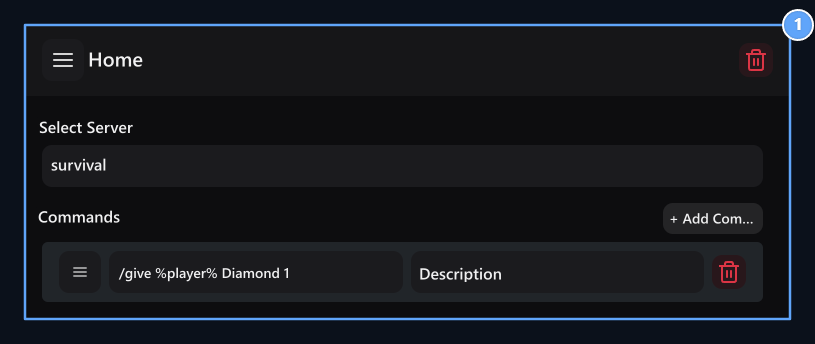
1. Server and commands
Set the target server, commands and descriptions.
Select the rule of re- votes
Vote Again There are two methods in the field:- After a certain period of time
- Reset every day
Duration (min) enter the waiting time in minutes. For example, for 12 hours.
Prepare ranking view
In the list of votes Settings open the button. Select how many people will show from the most voters and whether the reward information will appear.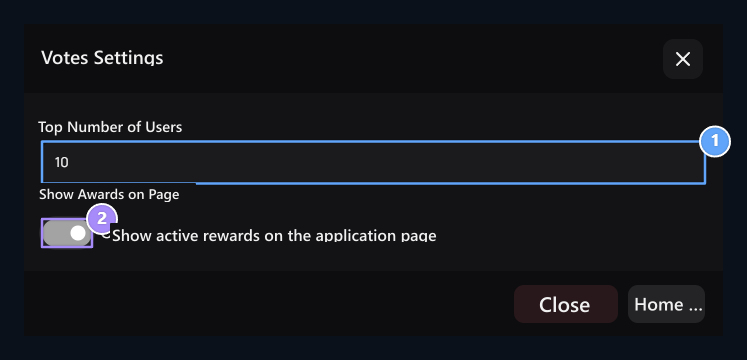
1. Rank count
How many people will be shown from the most voters.
2. Award information
Show rewards on the user screen.
How does the user vote?
1
Select the site
Login to your account and open the voting page of your site. Review the prize and waiting information.
2
Complete the voting
Go to the provider with the voting button and complete the process the provider wants.
3
Check out the probe
Check the verification status, reward and repeat usage information.
Game servers
Prepare the server connection to send the command prize.