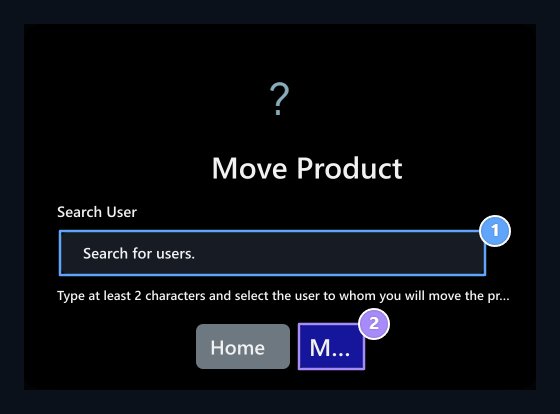
Addons On screen Product Transport Activate the record. The user can transfer the order to move from his account to another user.

Open the appropriate product

Product Stone, Transfer to Game

1. Product Stone

It appears in the product that expects to be transferred to the game.

2. Transfer to Game

Use the product and carry out other account is separate transactions.
User Profile → My orders passes to the section. Game transfer waiting… in case of appropriate product card Move Product button appears. On the same card Transfer To Gameuses the product in the gaming account; for transportation Move Product selected. The same processes may not be presented in the used or suspended orders. Check the current status of the card first.

Select buyer

Search for user, Move

1. Search for user

Select the recipient account from the list.

2. Stone

Confirms the process of carrying out selected account.
  1. Move Product Press the button.
  2. Write at least two characters from the name of the recipient to the user search.
  3. Select the correct account from the result list.
  4. Checking and controlling the product and buyer Move Confirm with button.
After writing the name, you need to choose from. Cancelcloses the window without processing. The account that the successful order belongs to changes; check the result message on the screen. To transfer balance Credit Submissionfor product definition Products Use the guide.