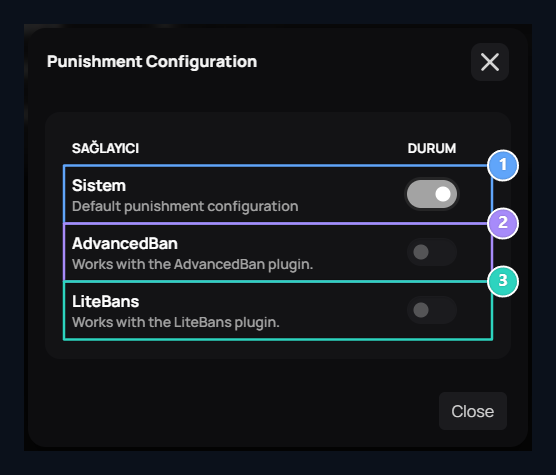
Add-ons → Uploaded in section Penalty Configuration Find the record. Options → Layout open the provider window via.

Select Provider

System, AdvancedBan, LiteBans

1. System

Use default Zonely criminal records with ZonelyCore.

2. AdvancedBan

Select this provider when you use advancedBan data.

3. LiteBans

Select this provider when you use LiteBans data.
When you open a provider, others close. If you close all System re-selected. Key change is directly saved; there is no separate Save button on the window. After selection Close Use the button.

Prepare game connection

If you are using ZonelyCore System Select, match the database link of the plugin with your site and activate the penalty module. If you are using AdvancedBan or LiteBans, prepare the plugin’s MySQL link to your own guide. The panel has to match the penalty records written by the source that the add-on has accessed. Compare the table prefix for LiteBans.

Check records

Member Settings → Penalties in section Latest Prohibitions, Recent Susturms or Latest Warnings Select list and call the user. If the registration does not appear, clean the search and open the right type. Check the selected provider, database server, port, name and user information. Compare the content that is created in the expected database of the registration with the connection result in the game console. Criminalization and registration Penalties is in the guide.