Open account providers and prepare site role mapping with personal Discord account.
Add-ons → Uploaded On the tab Linked Accounts Find the record. Options → Layout open the way. Manage social login and account link providers from this window.
Affiliate Accounts Zonely works through the ready-to-connect system. Create developer app for social account matching, Client ID, Client Secret or API token you don’t need to prepare. Open the provider from the panel; you complete the standard authorization step with the user’s own account.
Select Providers
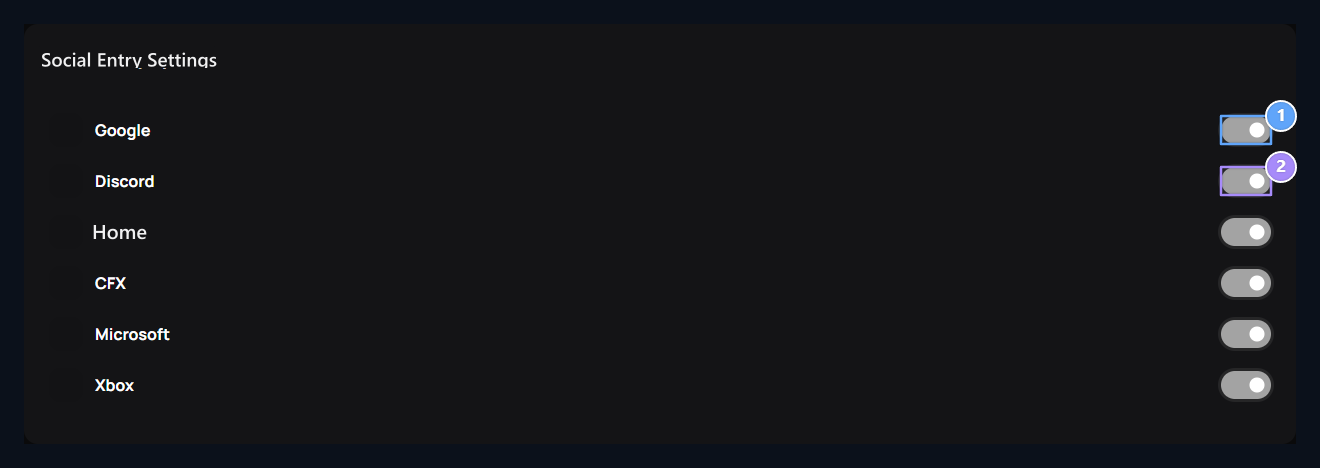
1. Google
Google provider’s availability.
2. Discord
Link choice with Discord account.
Google, Discord, Steam, CFX, Microsoft and Xbox There are separate keys for Open the provider you will use. Change is directly saved from the corresponding key; there is no common Save button.The provider’s open does not connect the user’s account by itself. The user completes authorization on their provider account during the connection.
Prepare Discord link
1. Discord provider
Change the status of the Discord provider with this key.
In this window Discord manages the status of the key provider. Open the provider if you will use login with Discord. For the user’s own Discord account paired Discord Matching Activate the plugin.Server connection Discord Bot Complete according to guide: add the bot to the server, on the panel Link Token code on the server /esle Use it with the command. This is the server connection of the bot; the personal user map is also done.
Match user account
The user log in to the site account.
From the Account menu Match Discord Account opens the option.
Check and confirms the Discord account to connect in the authorization window.
Checks the link result when it comes to the site.
The role will be given in the Discord server connected to the user bot. Unless authorization is completed, it does not connect the account to be hungry only.
Connect the role of the site to the role of Discord
Member Settings → Roller Open the role in the section. Discord Select and save the value on the server. Only given to users with a Discord account. If selected, personal account is the role condition of mapping.For example on the site News Connect the role to the counter in Discord. The user determines which role setting is used if the pair is to process with the Discord member. Details of areas Discord role mapping in the section.
{"docsConfig":{"theme":"aspen","$schema":"https://mintlify.com/docs.json","name":"Zonely","description":"Zonely oyun toplulukları ve dijital mağaza platformu: alan adı, kurulum, ürünler, ödemeler, sunucu bağlantıları ve destek için açıklamalı rehberler.","colors":{"primary":"#1a1919","light":"#f6f6f8","dark":"#1a1919"},"logo":{"light":"https://mintcdn.com/zonely-a8cd49e7/RhT7oGMq-hyCnspk/images/zonely-wordmark.png?fit=max\u0026auto=format\u0026n=RhT7oGMq-hyCnspk\u0026q=85\u0026s=8f4e1cd980c5e3ec7c0034205a73eb8a","dark":"https://mintcdn.com/zonely-a8cd49e7/RhT7oGMq-hyCnspk/images/zonely-wordmark.png?fit=max\u0026auto=format\u0026n=RhT7oGMq-hyCnspk\u0026q=85\u0026s=8f4e1cd980c5e3ec7c0034205a73eb8a","href":"/"},"favicon":"https://mintcdn.com/zonely-a8cd49e7/GcM-p7HWLemWfDEz/images/zonely-blue-20261108.png?fit=max\u0026auto=format\u0026n=GcM-p7HWLemWfDEz\u0026q=85\u0026s=c02d2c8d335309b621159a4d22b112dc","api":{"playground":{"display":"simple"},"examples":{"languages":["bash","javascript"]}},"appearance":{"default":"dark"},"background":{"color":{"light":"#f6f6f8","dark":"#1a1919"}},"navbar":{"links":[]},"search":{"prompt":"Bir ayar, sistem veya sorun ara..."},"seo":{"metatags":{"robots":"noindex, nofollow"},"indexing":"navigable"},"icons":{"library":"lucide"},"styling":{"eyebrows":"breadcrumbs","codeblocks":{"theme":"css-variables"},"latex":false},"contextual":{"options":[],"display":"header"},"navigation":{"languages":[{"language":"tr","default":true,"href":""},{"language":"en","href":"en"},{"language":"de","href":"de"},{"language":"cs","href":"cs"},{"language":"es","href":"es"},{"language":"fr","href":"fr"},{"language":"hi","href":"hi"},{"language":"hu","href":"hu"},{"language":"it","href":"it"},{"language":"ja","href":"ja"},{"language":"no","href":"nb"},{"language":"nl","href":"nl"},{"language":"pl","href":"pl"},{"language":"pt-BR","href":"pt-BR"},{"language":"ro","href":"ro"},{"language":"ru","href":"ru"},{"language":"sv","href":"sv"},{"language":"vi","href":"vi"},{"language":"zh-CN","href":"zh-CN"}]}},"deployment":{"deploymentMetadataValue":{"subdomain":"zonely-a8cd49e7","hasAudioNarration":false,"actualSubdomain":"zonely-a8cd49e7","customDomains":["docs.zonely.gen.tr"],"gitSource":{"type":"github","owner":"whiteeffect","repo":"docs","deployBranch":"main","contentDirectory":"","isPrivate":true,"mountPath":"","label":""},"entitlements":{},"buildId":"6af0742299ffa6db6967017f","clientVersion":"0.0.4143","searchFilterCounts":[{"language":"cs","tag":"Vývojáři","count":512},{"language":"de","tag":"Entwickler","count":512},{"language":"tr","tag":"Geliştiriciler","count":512},{"language":"en","tag":"Developers","count":512},{"language":"es","tag":"Desarrolladores","count":512},{"language":"fr","tag":"Développeurs","count":512},{"language":"hi","tag":"डेवलपर्स","count":512},{"language":"hu","tag":"Fejlesztők","count":512},{"language":"it","tag":"Sviluppatori","count":512},{"language":"ja","tag":"開発者","count":512},{"language":"no","tag":"Utviklere","count":512},{"language":"nl","tag":"Ontwikkelaars","count":512},{"language":"pl","tag":"Programiści","count":512},{"language":"pt-BR","tag":"Desenvolvedores","count":512},{"language":"ro","tag":"Dezvoltatori","count":512},{"language":"ru","tag":"Разработчики","count":512},{"language":"sv","tag":"Utvecklare","count":512},{"language":"vi","tag":"Nhà phát triển","count":512},{"language":"zh-CN","tag":"开发者","count":512},{"language":"cs","tag":"Odkaz na API","count":492},{"language":"de","tag":"API-Referenz","count":492},{"language":"tr","tag":"API referansı","count":492},{"language":"en","tag":"API Reference","count":492},{"language":"es","tag":"Referencia de API","count":492},{"language":"fr","tag":"Référence API","count":492},{"language":"hi","tag":"एपीआई संदर्भ","count":492},{"language":"hu","tag":"API hivatkozás","count":492},{"language":"it","tag":"API","count":492},{"language":"ja","tag":"API リファレンス","count":492},{"language":"no","tag":"API referanse","count":492},{"language":"nl","tag":"API-referentie","count":492},{"language":"pl","tag":"Odniesienie do API","count":492},{"language":"pt-BR","tag":"Referência da API","count":492},{"language":"ro","tag":"API Referință","count":492},{"language":"ru","tag":"API ссылка","count":492},{"language":"sv","tag":"API Referens","count":492},{"language":"vi","tag":"Tham khảo cho ADI","count":492},{"language":"zh-CN","tag":"API 参考","count":492},{"language":"cs","tag":"Uživatelská příručka","count":150},{"language":"de","tag":"Benutzerhandbuch","count":150},{"language":"tr","tag":"Kullanım rehberi","count":150},{"language":"en","tag":"User Guide","count":150},{"language":"es","tag":"Guía de usuario","count":150},{"language":"fr","tag":"Guide de l'utilisateur","count":150},{"language":"hi","tag":"उपयोगकर्ता गाइड","count":150},{"language":"hu","tag":"Felhasználói útmutató","count":150},{"language":"it","tag":"Guida utente","count":150},{"language":"ja","tag":"ユーザーガイド","count":150},{"language":"no","tag":"Brukerveiledning","count":150},{"language":"nl","tag":"Gebruikershandleiding","count":150},{"language":"pl","tag":"Przewodnik dla użytkowników","count":150},{"language":"pt-BR","tag":"Guia do Usuário","count":150},{"language":"ro","tag":"Ghid utilizator","count":150},{"language":"ru","tag":"Руководство пользователя","count":150},{"language":"sv","tag":"Användarguide","count":150},{"language":"vi","tag":"Hướng dẫn người dùng","count":150},{"language":"zh-CN","tag":"用户指南","count":150},{"language":"cs","tag":"Přídavné průvodce","count":36},{"language":"de","tag":"Add-on Guides","count":36},{"language":"tr","tag":"Eklenti rehberleri","count":36},{"language":"en","tag":"Add-on Guides","count":36},{"language":"es","tag":"Guías adicionales","count":36},{"language":"fr","tag":"Guides complémentaires","count":36},{"language":"hi","tag":"ऐड-ऑन गाइड","count":36},{"language":"hu","tag":"Kiegészítő útmutatók","count":36},{"language":"it","tag":"Guide aggiuntive","count":36},{"language":"ja","tag":"アドオンガイド","count":36},{"language":"no","tag":"Guider til tillegg","count":36},{"language":"nl","tag":"Hulplijnen voor toevoegen","count":36},{"language":"pl","tag":"Przewodniki addycyjne","count":36},{"language":"pt-BR","tag":"Guias adicionais","count":36},{"language":"ro","tag":"Ghiduri de completare","count":36},{"language":"ru","tag":"Дополнительные руководства","count":36},{"language":"sv","tag":"Add-on guider","count":36},{"language":"vi","tag":"Hướng dẫn bổ sung","count":36},{"language":"zh-CN","tag":"添加指南","count":36},{"language":"cs","tag":"Podpora v přímém přenosu","count":35},{"language":"de","tag":"Live Support","count":35},{"language":"tr","tag":"Canlı Destek","count":35},{"language":"en","tag":"Live Support","count":35},{"language":"es","tag":"Apoyo en vivo","count":35},{"language":"fr","tag":"Soutien en direct","count":35},{"language":"hi","tag":"लाइव समर्थन","count":35},{"language":"hu","tag":"Élő támogatás","count":35},{"language":"it","tag":"Supporto live","count":35},{"language":"ja","tag":"ライブサポート","count":35},{"language":"no","tag":"Live Support","count":35},{"language":"nl","tag":"Live ondersteuning","count":35},{"language":"pl","tag":"Wsparcie na żywo","count":35},{"language":"pt-BR","tag":"Suporte ao vivo.","count":35},{"language":"ro","tag":"Suport live","count":35},{"language":"ru","tag":"Живая поддержка","count":35},{"language":"sv","tag":"Live Support","count":35},{"language":"vi","tag":"Hỗ trợ trực tiếp","count":35},{"language":"zh-CN","tag":"现场支持","count":35},{"language":"cs","tag":"Platební brány","count":34},{"language":"de","tag":"Zahlungsgateways","count":34},{"language":"tr","tag":"Ödeme yöntemleri","count":34},{"language":"en","tag":"Payment Gateways","count":34},{"language":"es","tag":"Pagos por puerta","count":34},{"language":"fr","tag":"Portails de paiement","count":34},{"language":"hi","tag":"भुगतान गेटवे","count":34},{"language":"hu","tag":"Fizetési áthidaló utak","count":34},{"language":"it","tag":"Gateway di pagamento","count":34},{"language":"ja","tag":"決済ゲートウェイ","count":34},{"language":"no","tag":"Betalingsgateways","count":34},{"language":"nl","tag":"Betalingspoorten","count":34},{"language":"pl","tag":"Drogi płatnicze","count":34},{"language":"pt-BR","tag":"Gateways de pagamento","count":34},{"language":"ro","tag":"Porți de plată","count":34},{"language":"ru","tag":"Платежные шлюзы","count":34},{"language":"sv","tag":"Betalningsgateways","count":34},{"language":"vi","tag":"Cổng trả tiền","count":34},{"language":"zh-CN","tag":"支付网关","count":34},{"language":"cs","tag":"Integrace a nástroje","count":29},{"language":"de","tag":"Integrationen \u0026 Tools","count":29},{"language":"tr","tag":"Bağlantılar ve araçlar","count":29},{"language":"en","tag":"Integrations \u0026 Tools","count":29},{"language":"es","tag":"Integración \u0026quot; Herramientas","count":29},{"language":"fr","tag":"Intégrations et outils","count":29},{"language":"hi","tag":"एकीकरण और उपकरण","count":29},{"language":"hu","tag":"Integráció \u0026 Eszközök","count":29},{"language":"it","tag":"Integrazioni \u0026 Strumenti","count":29},{"language":"ja","tag":"統合とツール","count":29},{"language":"no","tag":"Integrasjon og verktøy","count":29},{"language":"nl","tag":"Integraties \u0026 hulpmiddelen","count":29},{"language":"pl","tag":"Integracje i narzędzia","count":29},{"language":"pt-BR","tag":"Integração e Ferramentas","count":29},{"language":"ro","tag":"Integrari și instrumente","count":29},{"language":"ru","tag":"Интеграции и инструменты","count":29},{"language":"sv","tag":"Integrationer och verktyg","count":29},{"language":"vi","tag":"Hợp nhất và Công cụ","count":29},{"language":"zh-CN","tag":"集成工具( T)","count":29},{"language":"cs","tag":"Obsah a design","count":26},{"language":"de","tag":"Inhalt \u0026 Design","count":26},{"language":"tr","tag":"İçerik ve görünüm","count":26},{"language":"en","tag":"Content \u0026 Design","count":26},{"language":"es","tag":"Contenido \u0026quot; Diseño \u0026quot;","count":26},{"language":"fr","tag":"Contenu \u0026 Conception","count":26},{"language":"hi","tag":"सामग्री डिजाइन","count":26},{"language":"hu","tag":"Tartalom \u0026 kialakítása","count":26},{"language":"it","tag":"Contenuto e design","count":26},{"language":"ja","tag":"コンテンツとデザイン","count":26},{"language":"no","tag":"Innhold og design","count":26},{"language":"nl","tag":"Inhoud \u0026 ontwerp","count":26},{"language":"pl","tag":"Zawartość i projekt","count":26},{"language":"pt-BR","tag":"Conteúdo e Design","count":26},{"language":"ro","tag":"Conţinut şi proiectare","count":26},{"language":"ru","tag":"Контент и дизайн","count":26},{"language":"sv","tag":"Innehåll \u0026 Design","count":26},{"language":"vi","tag":"Thiết kế nội dung","count":26},{"language":"zh-CN","tag":"内容和设计","count":26},{"language":"cs","tag":"Obchod a obchod","count":25},{"language":"de","tag":"Store \u0026 Commerce","count":25},{"language":"tr","tag":"Mağaza","count":25},{"language":"en","tag":"Store \u0026 Commerce","count":25},{"language":"es","tag":"Tienda \u0026amp; Comercio","count":25},{"language":"fr","tag":"Magasins et commerce","count":25},{"language":"hi","tag":"स्टोर और वाणिज्य","count":25},{"language":"hu","tag":"Üzlet \u0026 kereskedelem","count":25},{"language":"it","tag":"Negozio e Commercio","count":25},{"language":"ja","tag":"店舗・商取引","count":25},{"language":"no","tag":"Butikk og handel","count":25},{"language":"nl","tag":"Winkel \u0026 handel","count":25},{"language":"pl","tag":"Przechowywanie i handel","count":25},{"language":"pt-BR","tag":"Loja e Comércio","count":25},{"language":"ro","tag":"Magazin și comerț","count":25},{"language":"ru","tag":"Магазин и коммерция","count":25},{"language":"sv","tag":"Store \u0026 Commerce","count":25},{"language":"vi","tag":"Lưu \u0026 thương mại","count":25},{"language":"zh-CN","tag":"存储和商务","count":25},{"language":"cs","tag":"Produkty, kategorie a kupóny","count":22},{"language":"de","tag":"Produkte, Kategorien \u0026 Coupons","count":22},{"language":"tr","tag":"Ürünler, Kategoriler ve Kuponlar","count":22},{"language":"en","tag":"Products, Categories \u0026 Coupons","count":22},{"language":"es","tag":"Productos, Categorías \u0026amp; Cupones","count":22},{"language":"fr","tag":"Produits, catégories et coupons","count":22},{"language":"hi","tag":"उत्पाद, श्रेणियाँ और कूपन","count":22},{"language":"hu","tag":"Termékek, kategóriák és kuponok","count":22},{"language":"it","tag":"Prodotti, Categorie \u0026 Coupon","count":22},{"language":"ja","tag":"製品、カテゴリ、クーポン","count":22},{"language":"no","tag":"Produkter, kategorier og kuponger","count":22},{"language":"nl","tag":"Producten, categorieën en coupons","count":22},{"language":"pl","tag":"Produkty, Kategorie i Kupony","count":22},{"language":"pt-BR","tag":"Produtos, Categorias e Cupons","count":22},{"language":"ro","tag":"Produse, Categorii și Cupoane","count":22},{"language":"ru","tag":"Продукты, категории и купоны","count":22},{"language":"sv","tag":"Produkter, Kategorier \u0026 Kuponger","count":22},{"language":"vi","tag":"Sản phẩm, phân loại \u0026 lời mời","count":22},{"language":"zh-CN","tag":"产品、类别和库邦","count":22}]},"assistantConfig":{},"basePath":"","hasChatPermissions":false,"hasWebMcpPermissions":false,"toggles":[{"name":"kill-isr","enabled":true,"variant":{"name":"disabled","enabled":false,"feature_enabled":true},"impressionData":false},{"name":"custom-rbac-roles","enabled":true,"variant":{"name":"disabled","enabled":false,"feature_enabled":true},"impressionData":false},{"name":"agent-mintlify-slack","enabled":true,"variant":{"name":"disabled","enabled":false,"feature_enabled":true},"impressionData":false},{"name":"agent-integrations-settings","enabled":true,"variant":{"name":"disabled","enabled":false,"feature_enabled":true},"impressionData":false},{"name":"rbac-expansion","enabled":true,"variant":{"name":"disabled","enabled":false,"feature_enabled":true},"impressionData":false},{"name":"automations-pr-grouping","enabled":true,"variant":{"name":"disabled","enabled":false,"feature_enabled":true},"impressionData":false},{"name":"custom-prefix","enabled":true,"variant":{"name":"disabled","enabled":false,"feature_enabled":true},"impressionData":false},{"name":"analytics-v7","enabled":true,"variant":{"name":"disabled","enabled":false,"feature_enabled":true},"impressionData":false},{"name":"user-flows-analytics","enabled":true,"variant":{"name":"disabled","enabled":false,"feature_enabled":true},"impressionData":false},{"name":"no-publish-flow","enabled":true,"variant":{"name":"disabled","enabled":false,"feature_enabled":true},"impressionData":false},{"name":"workos-onboarding","enabled":true,"variant":{"name":"disabled","enabled":false,"feature_enabled":true},"impressionData":false},{"name":"snapshot-serving-live","enabled":true,"variant":{"name":"disabled","enabled":false,"feature_enabled":true},"impressionData":false},{"name":"stripTemperatureMiddleware","enabled":true,"variant":{"name":"disabled","enabled":false,"feature_enabled":true},"impressionData":false},{"name":"support-platform-pylon-zendesk","enabled":true,"variant":{"name":"disabled","enabled":false,"feature_enabled":true},"impressionData":false},{"name":"snapshot-serving","enabled":true,"variant":{"name":"disabled","enabled":false,"feature_enabled":true},"impressionData":false},{"name":"instant-rollback","enabled":true,"variant":{"name":"disabled","enabled":false,"feature_enabled":true},"impressionData":false},{"name":"granular-notifications-server","enabled":true,"variant":{"name":"disabled","enabled":false,"feature_enabled":true},"impressionData":false},{"name":"granular-notifications","enabled":true,"variant":{"name":"disabled","enabled":false,"feature_enabled":true},"impressionData":false},{"name":"automations-fable","enabled":true,"variant":{"name":"disabled","enabled":false,"feature_enabled":true},"impressionData":false},{"name":"fixed-ai-action-pricing","enabled":true,"variant":{"name":"disabled","enabled":false,"feature_enabled":true},"impressionData":false},{"name":"automation-resolve-merge-conflict","enabled":true,"variant":{"name":"disabled","enabled":false,"feature_enabled":true},"impressionData":false},{"name":"scoped-publishing","enabled":true,"variant":{"name":"disabled","enabled":false,"feature_enabled":true},"impressionData":false},{"name":"mintql","enabled":true,"variant":{"name":"disabled","enabled":false,"feature_enabled":true},"impressionData":false},{"name":"page-level-analytics","enabled":true,"variant":{"name":"disabled","enabled":false,"feature_enabled":true},"impressionData":false},{"name":"editor-version-history-v2","enabled":true,"variant":{"name":"disabled","enabled":false,"feature_enabled":true},"impressionData":false},{"name":"billing-page-v2","enabled":true,"variant":{"name":"disabled","enabled":false,"feature_enabled":true},"impressionData":false},{"name":"full-page-search","enabled":true,"variant":{"name":"disabled","enabled":false,"feature_enabled":true},"impressionData":false},{"name":"workspace-projects","enabled":true,"variant":{"name":"disabled","enabled":false,"feature_enabled":true},"impressionData":false},{"name":"assistant-v5","enabled":true,"variant":{"name":"disabled","enabled":false,"feature_enabled":true},"impressionData":false},{"name":"fork-pr-previews","enabled":true,"variant":{"name":"disabled","enabled":false,"feature_enabled":true},"impressionData":false},{"name":"revalidation-jwt","enabled":true,"variant":{"name":"disabled","enabled":false,"feature_enabled":true},"impressionData":false},{"name":"workos-sso-scim","enabled":true,"variant":{"name":"disabled","enabled":false,"feature_enabled":true},"impressionData":false},{"name":"hobby-abuse-scan","enabled":true,"variant":{"name":"disabled","enabled":false,"feature_enabled":true},"impressionData":false},{"name":"dashboard-inbox","enabled":true,"variant":{"name":"disabled","enabled":false,"feature_enabled":true},"impressionData":false},{"name":"workos-signup","enabled":true,"variant":{"name":"disabled","enabled":false,"feature_enabled":true},"impressionData":false},{"name":"turbopuffer-dual-write","enabled":true,"variant":{"name":"disabled","enabled":false,"feature_enabled":true},"impressionData":false},{"name":"workos-enabled","enabled":true,"variant":{"name":"disabled","enabled":false,"feature_enabled":true},"impressionData":false},{"name":"approve-review-flow","enabled":true,"variant":{"name":"disabled","enabled":false,"feature_enabled":true},"impressionData":false},{"name":"editor-metadata","enabled":true,"variant":{"name":"disabled","enabled":false,"feature_enabled":true},"impressionData":false},{"name":"sso-setup-deadline-banner","enabled":true,"variant":{"name":"disabled","enabled":false,"feature_enabled":true},"impressionData":false},{"name":"turbopuffer-serve","enabled":true,"variant":{"name":"disabled","enabled":false,"feature_enabled":true},"impressionData":false},{"name":"live-agents","enabled":true,"variant":{"name":"disabled","enabled":false,"feature_enabled":true},"impressionData":false},{"name":"llms-txt-v2","enabled":true,"variant":{"name":"disabled","enabled":false,"feature_enabled":true},"impressionData":false}],"googleFontsInlined":false},"customCss":[{"filePath":"style.css","content":":root{--zn-accent:#1a1919;--zn-text:#172033;--zn-muted:#586579;--zn-surface:#f6f6f8;--zn-soft:#ededf0;--zn-line:#dce4ef}.dark{--zn-accent:#f6f6f8;--zn-text:#e5edf8;--zn-muted:#a2b1c6;--zn-surface:#1a1919;--zn-soft:#242323;--zn-line:#292929}.zn-intro-kicker{margin:8px 0 20px;color:var(--zn-accent);font-size:11px;font-weight:600;letter-spacing:.1em}.zn-lead{margin-bottom:28px;color:var(--zn-muted);font-size:18px;line-height:1.7}.zn-video{width:100%;aspect-ratio:16/9;margin:18px 0 28px;border:0;border-radius:8px}.zn-doc-figure{display:block;margin:28px 0;overflow:hidden;border:1px solid var(--zn-line);border-radius:8px;text-decoration:none!important}.zn-doc-figure img{display:block;width:100%;max-width:100%;height:auto;margin:0!important}.zn-doc-figure:focus-visible{outline:2px solid var(--zn-accent);outline-offset:4px}.zn-product-example img{height:160px;padding:14px;object-fit:contain}.zn-plugin-config{--mint-token-keyword:#93c5fd;--mint-token-constant:#fbbf24;--mint-token-string-expression:#a7f3d0}#zn-search-dialog{box-sizing:border-box;width:min(720px,calc(100vw - 28px));max-height:88vh;margin:9vh auto 0;padding:24px;overflow:auto;border:1px solid var(--zn-line);border-radius:12px;background:var(--zn-surface);color:var(--zn-text);box-shadow:0 24px 80px #0003}#zn-search-dialog::backdrop{background:#0f172a88}.zn-search-head{display:flex;align-items:center;justify-content:space-between;gap:16px;margin-bottom:16px;font-size:16px;font-weight:600}.zn-search-head button{padding:4px 8px;border:1px solid var(--zn-line);border-radius:6px;color:var(--zn-muted);font-size:11px;cursor:pointer}#zn-search-query{box-sizing:border-box;width:100%;padding:14px 16px;border:1px solid var(--zn-accent);border-radius:8px;background:var(--zn-soft);color:var(--zn-text);font:inherit;font-size:16px}#zn-search-count{margin:14px 0;color:var(--zn-muted);font-size:12px}#zn-search-results{display:grid;gap:6px}#zn-search-results a{padding:13px;border:1px solid transparent;border-radius:8px;color:inherit;text-decoration:none}#zn-search-results a:hover,#zn-search-results a.is-selected{border-color:var(--zn-line);background:var(--zn-soft)}#zn-search-results strong{display:block;margin-bottom:5px;font-size:14px}#zn-search-results span{display:block;color:var(--zn-muted);font-size:12px;line-height:1.65}.zn-developer-code{--mint-background:#0b1020;--mint-foreground:#e5e7eb;--mint-token-keyword:#c4b5fd;--mint-token-function:#93c5fd;--mint-token-string:#86efac;--mint-token-string-expression:#86efac;--mint-token-constant:#fbbf24;--mint-token-comment:#94a3b8;--mint-token-punctuation:#cbd5e1;--mint-token-parameter:#f9a8d4}.zn-developer-code .code-block-background{background-color:#0b1020!important;border:1px solid #263448}html.dark,html.dark body{background-color:#1a1919!important}.dark #navbar,.dark #sidebar,.dark #sidebar-content,.dark #content-container{background-color:#1a1919!important}.dark .zn-developer-code{--mint-background:#1a1919}.dark .zn-developer-code .code-block-background{background-color:#1a1919!important;border-color:#292929}footer,#footer{display:none!important}html:not(.dark),html:not(.dark) body{background-color:#f6f6f8!important}html:not(.dark) :is(#navbar,#sidebar,#sidebar-content,#content-container){background-color:#f6f6f8!important}img[src*=\"zonely-wordmark.png\"]{filter:brightness(0);opacity:1!important}.dark img[src*=\"zonely-wordmark.png\"]{filter:brightness(0) invert(1)}.dark img[src*=\"/doc-icons/\"]:not([src*=\"/odemeler--\"]){filter:grayscale(1) brightness(0) invert(1)}html:not(.dark) img[src*=\"/doc-icons/\"]:not([src*=\"/odemeler--\"]){filter:grayscale(1) brightness(0)}.dark :is([role=\"menu\"],[role=\"listbox\"],[data-radix-popper-content-wrapper]>div){background-color:#1a1919!important;color:#f6f6f8}html:not(.dark) :is([role=\"menu\"],[role=\"listbox\"]){background-color:#f6f6f8!important;color:#1a1919}.dark #sidebar [aria-current=\"page\"]{background-color:rgba(246,246,248,.09)!important;color:#f6f6f8!important}.dark #sidebar [aria-current=\"page\"] *{color:inherit!important}html img[src*=\"/doc-icons/odemeler--\"],html img[src*=\"/images/payments/\"]{filter:none!important;opacity:1!important}"}],"page":{"pagePath":"en/guides/linked-accounts","slug":"/en/guides/linked-accounts","pageMetadata":{"title":"Linked Accounts","description":"Open account providers and prepare site role mapping with personal Discord account.","icon":"/images/doc-icons/rehberler--hesap-eslestirme.svg","href":"/en/guides/linked-accounts"},"description":{"compiledSource":"\"use strict\";\nconst {jsx: _jsx} = arguments[0];\nconst {useMDXComponents: _provideComponents} = arguments[0];\nfunction _createMdxContent(props) {\n const _components = {\n p: \"p\",\n ..._provideComponents(),\n ...props.components\n };\n return _jsx(_components.p, {\n children: \"Open account providers and prepare site role mapping with personal Discord account.\"\n });\n}\nfunction MDXContent(props = {}) {\n const {wrapper: MDXLayout} = {\n ..._provideComponents(),\n ...props.components\n };\n return MDXLayout ? _jsx(MDXLayout, {\n ...props,\n children: _jsx(_createMdxContent, {\n ...props\n })\n }) : _createMdxContent(props);\n}\nreturn {\n default: MDXContent\n};\n","frontmatter":{},"scope":{}},"pageType":"default","mdx":{"mdxSource":{"compiledSource":"\"use strict\";const{Fragment:_Fragment,jsx:_jsx,jsxs:_jsxs}=arguments[0];const{useMDXComponents:_provideComponents}=arguments[0];function _createMdxContent(props){const _components={a:`a`,li:`li`,ol:`ol`,p:`p`,strong:`strong`,..._provideComponents(),...props.components},{Card,CardGroup,Heading,OptimizedImage,Tip}=_components;if(!Card)_missingMdxReference(`Card`,true);if(!CardGroup)_missingMdxReference(`CardGroup`,true);if(!Heading)_missingMdxReference(`Heading`,true);if(!OptimizedImage)_missingMdxReference(`OptimizedImage`,true);if(!Tip)_missingMdxReference(`Tip`,true);return _jsxs(_Fragment,{children:[_jsxs(_components.p,{children:[_jsx(_components.strong,{children:`Add-ons → Uploaded`}),` On the tab `,_jsx(_components.strong,{children:`Linked Accounts`}),` Find the record. `,_jsx(_components.strong,{children:`Options → Layout`}),` open the way. Manage social login and account link providers from this window.`]}),`\n`,_jsx(Tip,{children:_jsxs(_components.p,{children:[`Affiliate Accounts `,_jsx(_components.strong,{children:`Zonely works through the ready-to-connect system`}),`. Create developer app for social account matching, `,_jsx(_components.strong,{children:`Client ID, Client Secret or API token`}),` you don’t need to prepare. Open the provider from the panel; you complete the standard authorization step with the user’s own account.`]})}),`\n`,_jsx(Heading,{level:`2`,id:`select-providers`,children:`Select Providers`}),`\n`,_jsx(_components.a,{className:`zn-doc-figure`,href:`/images/panel/addon-settings-guide-20261027/hesap-eslestirme-01-en.png`,target:`_blank`,rel:`noreferrer`,children:_jsx(OptimizedImage,{src:`https://mintcdn.com/zonely-a8cd49e7/J06Xxagz8QoqZ5XZ/images/panel/addon-settings-guide-20261027/hesap-eslestirme-01-en.png?fit=max\u0026auto=format\u0026n=J06Xxagz8QoqZ5XZ\u0026q=85\u0026s=eccecb8457ab4be6789346db4513cd67`,alt:`Google, Discord`,\"data-og-width\":`1320`,width:`1320`,\"data-og-height\":`468`,height:`468`,\"data-path\":`images/panel/addon-settings-guide-20261027/hesap-eslestirme-01-en.png`,\"data-optimize\":`true`,\"data-opv\":`3`,srcset:`https://mintcdn.com/zonely-a8cd49e7/J06Xxagz8QoqZ5XZ/images/panel/addon-settings-guide-20261027/hesap-eslestirme-01-en.png?w=280\u0026fit=max\u0026auto=format\u0026n=J06Xxagz8QoqZ5XZ\u0026q=85\u0026s=abb48beba648b5eba555b44126403eb3 280w, https://mintcdn.com/zonely-a8cd49e7/J06Xxagz8QoqZ5XZ/images/panel/addon-settings-guide-20261027/hesap-eslestirme-01-en.png?w=560\u0026fit=max\u0026auto=format\u0026n=J06Xxagz8QoqZ5XZ\u0026q=85\u0026s=7f73eecb31b77c0c1e6662e134e7d093 560w, https://mintcdn.com/zonely-a8cd49e7/J06Xxagz8QoqZ5XZ/images/panel/addon-settings-guide-20261027/hesap-eslestirme-01-en.png?w=840\u0026fit=max\u0026auto=format\u0026n=J06Xxagz8QoqZ5XZ\u0026q=85\u0026s=08da21e7da9b0fe0dbca702adc79b17f 840w, https://mintcdn.com/zonely-a8cd49e7/J06Xxagz8QoqZ5XZ/images/panel/addon-settings-guide-20261027/hesap-eslestirme-01-en.png?w=1100\u0026fit=max\u0026auto=format\u0026n=J06Xxagz8QoqZ5XZ\u0026q=85\u0026s=7b0f144093faa687566cb702f5cbca34 1100w, https://mintcdn.com/zonely-a8cd49e7/J06Xxagz8QoqZ5XZ/images/panel/addon-settings-guide-20261027/hesap-eslestirme-01-en.png?w=1650\u0026fit=max\u0026auto=format\u0026n=J06Xxagz8QoqZ5XZ\u0026q=85\u0026s=5fc0c49a425773cb347e493fba4a9f7d 1650w, https://mintcdn.com/zonely-a8cd49e7/J06Xxagz8QoqZ5XZ/images/panel/addon-settings-guide-20261027/hesap-eslestirme-01-en.png?w=2500\u0026fit=max\u0026auto=format\u0026n=J06Xxagz8QoqZ5XZ\u0026q=85\u0026s=33408db6cdee9186476d962b7ab8c2c4 2500w`})}),`\n`,_jsxs(CardGroup,{cols:2,children:[_jsx(Card,{title:`1. Google`,children:`Google provider’s availability.`}),_jsx(Card,{title:`2. Discord`,children:`Link choice with Discord account.`})]}),`\n`,_jsxs(_components.p,{children:[_jsx(_components.strong,{children:`Google, Discord, Steam, CFX, Microsoft`}),` and `,_jsx(_components.strong,{children:`Xbox`}),` There are separate keys for Open the provider you will use. Change is directly saved from the corresponding key; there is no common Save button.`]}),`\n`,_jsx(_components.p,{children:`The provider’s open does not connect the user’s account by itself. The user completes authorization on their provider account during the connection.`}),`\n`,_jsx(`a`,{id:`discord-hesabi-esleme`}),`\n`,_jsx(Heading,{level:`2`,id:`prepare-discord-link`,children:`Prepare Discord link`}),`\n`,_jsx(_components.a,{className:`zn-doc-figure`,href:`/images/panel/roles-guide-20261025/r20-discord-saglayicisi-en.png`,target:`_blank`,rel:`noreferrer`,children:_jsx(OptimizedImage,{src:`https://mintcdn.com/zonely-a8cd49e7/CQiXr9MeKko3ftBp/images/panel/roles-guide-20261025/r20-discord-saglayicisi-en.png?fit=max\u0026auto=format\u0026n=CQiXr9MeKko3ftBp\u0026q=85\u0026s=437470b7da8141975ccd74f8db49d465`,alt:`Discord provider`,\"data-og-width\":`1094`,width:`1094`,\"data-og-height\":`107`,height:`107`,\"data-path\":`images/panel/roles-guide-20261025/r20-discord-saglayicisi-en.png`,\"data-optimize\":`true`,\"data-opv\":`3`,srcset:`https://mintcdn.com/zonely-a8cd49e7/CQiXr9MeKko3ftBp/images/panel/roles-guide-20261025/r20-discord-saglayicisi-en.png?w=280\u0026fit=max\u0026auto=format\u0026n=CQiXr9MeKko3ftBp\u0026q=85\u0026s=1b78c0d91f237239b7d136c920317a91 280w, https://mintcdn.com/zonely-a8cd49e7/CQiXr9MeKko3ftBp/images/panel/roles-guide-20261025/r20-discord-saglayicisi-en.png?w=560\u0026fit=max\u0026auto=format\u0026n=CQiXr9MeKko3ftBp\u0026q=85\u0026s=47ff5d824e152d825b94de9dc9d67d3d 560w, https://mintcdn.com/zonely-a8cd49e7/CQiXr9MeKko3ftBp/images/panel/roles-guide-20261025/r20-discord-saglayicisi-en.png?w=840\u0026fit=max\u0026auto=format\u0026n=CQiXr9MeKko3ftBp\u0026q=85\u0026s=4cd3f4a310d36b25c4545e695c751447 840w, https://mintcdn.com/zonely-a8cd49e7/CQiXr9MeKko3ftBp/images/panel/roles-guide-20261025/r20-discord-saglayicisi-en.png?w=1100\u0026fit=max\u0026auto=format\u0026n=CQiXr9MeKko3ftBp\u0026q=85\u0026s=56b567d5306b48402c0c45255147594a 1100w, https://mintcdn.com/zonely-a8cd49e7/CQiXr9MeKko3ftBp/images/panel/roles-guide-20261025/r20-discord-saglayicisi-en.png?w=1650\u0026fit=max\u0026auto=format\u0026n=CQiXr9MeKko3ftBp\u0026q=85\u0026s=15878a1f6538a36e21a54d01c5be3d31 1650w, https://mintcdn.com/zonely-a8cd49e7/CQiXr9MeKko3ftBp/images/panel/roles-guide-20261025/r20-discord-saglayicisi-en.png?w=2500\u0026fit=max\u0026auto=format\u0026n=CQiXr9MeKko3ftBp\u0026q=85\u0026s=40639d539bf2ac97d892a8095baab005 2500w`})}),`\n`,_jsx(CardGroup,{cols:1,children:_jsx(Card,{title:`1. Discord provider`,children:`Change the status of the Discord provider with this key.`})}),`\n`,_jsxs(_components.p,{children:[`In this window `,_jsx(_components.strong,{children:`Discord`}),` manages the status of the key provider. Open the provider if you will use login with Discord. For the user’s own Discord account paired `,_jsx(_components.strong,{children:`Discord Matching`}),` Activate the plugin.`]}),`\n`,_jsxs(_components.p,{children:[`Server connection `,_jsx(_components.a,{href:`/en/guides/discord-bot`,children:`Discord Bot`}),` Complete according to guide: add the bot to the server, on the panel `,_jsx(_components.strong,{children:`Link Token`}),` code on the server `,_jsx(_components.strong,{children:`/esle`}),` Use it with the command. This is the server connection of the bot; the personal user map is also done.`]}),`\n`,_jsx(Heading,{level:`2`,id:`match-user-account`,children:`Match user account`}),`\n`,_jsxs(_components.ol,{children:[`\n`,_jsx(_components.li,{children:`The user log in to the site account.`}),`\n`,_jsxs(_components.li,{children:[`From the Account menu `,_jsx(_components.strong,{children:`Match Discord Account`}),` opens the option.`]}),`\n`,_jsx(_components.li,{children:`Check and confirms the Discord account to connect in the authorization window.`}),`\n`,_jsx(_components.li,{children:`Checks the link result when it comes to the site.`}),`\n`]}),`\n`,_jsx(_components.p,{children:`The role will be given in the Discord server connected to the user bot. Unless authorization is completed, it does not connect the account to be hungry only.`}),`\n`,_jsx(Heading,{level:`2`,id:`connect-the-role-of-the-site-to-the-role-of-discord`,children:`Connect the role of the site to the role of Discord`}),`\n`,_jsxs(_components.p,{children:[_jsx(_components.strong,{children:`Member Settings → Roller`}),` Open the role in the section. `,_jsx(_components.strong,{children:`Discord`}),` Select and save the value on the server. `,_jsx(_components.strong,{children:`Only given to users with a Discord account.`}),` If selected, personal account is the role condition of mapping.`]}),`\n`,_jsxs(_components.p,{children:[`For example on the site `,_jsx(_components.strong,{children:`News`}),` Connect the role to the counter in Discord. The user determines which role setting is used if the pair is to process with the Discord member. Details of areas `,_jsx(_components.a,{href:`/en/guides/permissions#discord-rol-esleme`,children:`Discord role mapping`}),` in the section.`]})]})}function MDXContent(props={}){const{wrapper:MDXLayout}={..._provideComponents(),...props.components};return MDXLayout?_jsx(MDXLayout,{...props,children:_jsx(_createMdxContent,{...props})}):_createMdxContent(props)}return{default:MDXContent};function _missingMdxReference(id,component){throw new Error(`Expected `+(component?`component`:`object`)+\" `\"+id+\"` to be defined: you likely forgot to import, pass, or provide it.\")}","frontmatter":{},"scope":{"codeStyling":{"theme":"css-variables"},"config":{},"pageMetadata":{"title":"Linked Accounts","description":"Open account providers and prepare site role mapping with personal Discord account.","icon":"/images/doc-icons/rehberler--hesap-eslestirme.svg","href":"/en/guides/linked-accounts"}}},"mdxSourceWithNoJs":null},"mdxExtracts":{"tableOfContents":[{"title":"Select Providers","slug":"select-providers","depth":2,"children":[]},{"title":"Prepare Discord link","slug":"prepare-discord-link","depth":2,"children":[]},{"title":"Match user account","slug":"match-user-account","depth":2,"children":[]},{"title":"Connect the role of the site to the role of Discord","slug":"connect-the-role-of-the-site-to-the-role-of-discord","depth":2,"children":[]}],"codeExamples":{}},"jsLinks":["/_mintlify/custom/zonely-a8cd49e7/77d52ace56ef656f/brand-names.js"],"subdomain":"zonely-a8cd49e7","siteName":"Zonely","title":"Linked Accounts - Zonely","navMaps":{"firstHrefInVersion":{},"firstHrefInLanguage":{"tr":{"href":"/guides/linked-accounts","matchLevel":1},"en":{"href":"/en/guides/linked-accounts","matchLevel":0},"de":{"href":"/de/guides/linked-accounts","matchLevel":1},"cs":{"href":"/cs/guides/linked-accounts","matchLevel":1},"es":{"href":"/es/guides/linked-accounts","matchLevel":1},"fr":{"href":"/fr/guides/linked-accounts","matchLevel":1},"hi":{"href":"/hi/guides/linked-accounts","matchLevel":1},"hu":{"href":"/hu/guides/linked-accounts","matchLevel":1},"it":{"href":"/it/guides/linked-accounts","matchLevel":1},"ja":{"href":"/ja/guides/linked-accounts","matchLevel":1},"no":{"href":"/nb/guides/linked-accounts","matchLevel":1},"nl":{"href":"/nl/guides/linked-accounts","matchLevel":1},"pl":{"href":"/pl/guides/linked-accounts","matchLevel":1},"pt-BR":{"href":"/pt-BR/guides/linked-accounts","matchLevel":1},"ro":{"href":"/ro/guides/linked-accounts","matchLevel":1},"ru":{"href":"/ru/guides/linked-accounts","matchLevel":1},"sv":{"href":"/sv/guides/linked-accounts","matchLevel":1},"vi":{"href":"/vi/guides/linked-accounts","matchLevel":1},"zh-CN":{"href":"/zh-CN/guides/linked-accounts","matchLevel":1}}},"lastModified":"2026-11-04T13:30:34.859Z","originalFileLocation":"en/guides/linked-accounts.mdx","locale":"en"},"headHtml":"\u003cscript data-mint-head>(function(){var d=document.documentElement,p=null;if(!p){try{p=localStorage.getItem(\"isDarkMode\")}catch(e){}if(p==='true')p='dark';else if(p==='false')p='light';if(p!=='light'\u0026\u0026p!=='dark'\u0026\u0026p!=='system')p=\"dark\"}var r=p==='system'?(matchMedia(\"(prefers-color-scheme: dark)\").matches?'dark':'light'):p;d.classList.remove(r==='dark'?'light':'dark');d.classList.add(r);d.setAttribute(\"data-theme-preference\",p)})();\u003c/script>\u003cmeta data-mint-head name=\"description\" content=\"Open account providers and prepare site role mapping with personal Discord account.\">\u003cmeta data-mint-head name=\"application-name\" content=\"Zonely\">\u003cmeta data-mint-head name=\"generator\" content=\"Mintlify\">\u003cmeta data-mint-head name=\"robots\" content=\"noindex, nofollow\">\u003clink data-mint-head rel=\"icon\" type=\"image/png\" sizes=\"192x192\" href=\"/mintlify-assets/_mintlify/favicons/zonely-a8cd49e7/k1u783JXjpycFRIG/_generated/favicon/android-chrome-192x192.png\" media=\"(prefers-color-scheme: light)\">\u003clink data-mint-head rel=\"apple-touch-icon\" type=\"image/png\" sizes=\"180x180\" href=\"/mintlify-assets/_mintlify/favicons/zonely-a8cd49e7/k1u783JXjpycFRIG/_generated/favicon/apple-touch-icon.png\">\u003clink data-mint-head rel=\"icon\" type=\"image/png\" sizes=\"16x16\" href=\"/mintlify-assets/_mintlify/favicons/zonely-a8cd49e7/k1u783JXjpycFRIG/_generated/favicon/favicon-16x16.png\" media=\"(prefers-color-scheme: light)\">\u003clink data-mint-head rel=\"icon\" type=\"image/png\" sizes=\"32x32\" href=\"/mintlify-assets/_mintlify/favicons/zonely-a8cd49e7/k1u783JXjpycFRIG/_generated/favicon/favicon-32x32.png\" media=\"(prefers-color-scheme: light)\">\u003clink data-mint-head rel=\"shortcut icon\" type=\"image/x-icon\" href=\"/mintlify-assets/_mintlify/favicons/zonely-a8cd49e7/k1u783JXjpycFRIG/_generated/favicon/favicon.ico\" media=\"(prefers-color-scheme: light)\">\u003clink data-mint-head rel=\"icon\" type=\"image/png\" sizes=\"192x192\" href=\"/mintlify-assets/_mintlify/favicons/zonely-a8cd49e7/k1u783JXjpycFRIG/_generated/favicon-dark/android-chrome-192x192.png\" media=\"(prefers-color-scheme: dark)\">\u003clink data-mint-head rel=\"icon\" type=\"image/png\" sizes=\"16x16\" href=\"/mintlify-assets/_mintlify/favicons/zonely-a8cd49e7/k1u783JXjpycFRIG/_generated/favicon-dark/favicon-16x16.png\" media=\"(prefers-color-scheme: dark)\">\u003clink data-mint-head rel=\"icon\" type=\"image/png\" sizes=\"32x32\" href=\"/mintlify-assets/_mintlify/favicons/zonely-a8cd49e7/k1u783JXjpycFRIG/_generated/favicon-dark/favicon-32x32.png\" media=\"(prefers-color-scheme: dark)\">\u003clink data-mint-head rel=\"shortcut icon\" type=\"image/x-icon\" href=\"/mintlify-assets/_mintlify/favicons/zonely-a8cd49e7/k1u783JXjpycFRIG/_generated/favicon-dark/favicon.ico\" media=\"(prefers-color-scheme: dark)\">\u003cmeta data-mint-head property=\"og:title\" content=\"Linked Accounts - Zonely\">\u003cmeta data-mint-head property=\"og:description\" content=\"Open account providers and prepare site role mapping with personal Discord account.\">\u003cmeta data-mint-head property=\"og:site_name\" content=\"Zonely\">\u003cmeta data-mint-head property=\"og:url\" content=\"https://docs.zonely.gen.tr/en/guides/linked-accounts\">\u003cmeta data-mint-head property=\"og:type\" content=\"website\">\u003cmeta data-mint-head property=\"og:image\" content=\"https://zonely-a8cd49e7.mintlify.site/_mintlify/api/og/v2?division=Social+%26+Community\u0026amp;title=Linked+Accounts\u0026amp;description=Open+account+providers+and+prepare+site+role+mapping+with+personal+Discord+account.\u0026amp;theme=4e9cefd5c98e2f4c1d4c6f4d\u0026amp;signature=715e78d90ec1ae15b44e72b011bb095a049bf349b1357af045168dbb1ca14a79\">\u003cmeta data-mint-head property=\"og:image:width\" content=\"1200\">\u003cmeta data-mint-head property=\"og:image:height\" content=\"630\">\u003cmeta data-mint-head name=\"twitter:card\" content=\"summary_large_image\">\u003cmeta data-mint-head name=\"twitter:title\" content=\"Linked Accounts - Zonely\">\u003cmeta data-mint-head name=\"twitter:description\" content=\"Open account providers and prepare site role mapping with personal Discord account.\">\u003cmeta data-mint-head name=\"twitter:image\" content=\"https://zonely-a8cd49e7.mintlify.site/_mintlify/api/og/v2?division=Social+%26+Community\u0026amp;title=Linked+Accounts\u0026amp;description=Open+account+providers+and+prepare+site+role+mapping+with+personal+Discord+account.\u0026amp;theme=4e9cefd5c98e2f4c1d4c6f4d\u0026amp;signature=715e78d90ec1ae15b44e72b011bb095a049bf349b1357af045168dbb1ca14a79\">\u003cmeta data-mint-head name=\"twitter:image:width\" content=\"1200\">\u003cmeta data-mint-head name=\"twitter:image:height\" content=\"630\">\u003cmeta data-mint-head name=\"msapplication-config\" content=\"/mintlify-assets/_mintlify/favicons/zonely-a8cd49e7/k1u783JXjpycFRIG/_generated/favicon/browserconfig.xml\">\u003cmeta data-mint-head name=\"apple-mobile-web-app-title\" content=\"Zonely\">\u003cmeta data-mint-head name=\"msapplication-TileColor\" content=\"#1a1919\">\u003clink data-mint-head rel=\"canonical\" href=\"https://docs.zonely.gen.tr/en/guides/linked-accounts\">\u003clink data-mint-head rel=\"alternate\" type=\"application/xml\" href=\"/sitemap.xml\">\u003clink data-mint-head rel=\"alternate\" type=\"text/markdown\" href=\"/en/guides/linked-accounts.md\">\u003cscript data-mint-head type=\"application/ld+json\">{\"@context\":\"https://schema.org\",\"@graph\":[{\"@type\":\"Organization\",\"@id\":\"https://docs.zonely.gen.tr/#organization\",\"name\":\"Zonely\",\"url\":\"https://docs.zonely.gen.tr\",\"logo\":{\"@type\":\"ImageObject\",\"url\":\"https://mintcdn.com/zonely-a8cd49e7/RhT7oGMq-hyCnspk/images/zonely-wordmark.png?fit=max\u0026auto=format\u0026n=RhT7oGMq-hyCnspk\u0026q=85\u0026s=8f4e1cd980c5e3ec7c0034205a73eb8a\"}},{\"@type\":\"WebSite\",\"@id\":\"https://docs.zonely.gen.tr#website\",\"name\":\"Zonely\",\"url\":\"https://docs.zonely.gen.tr\",\"publisher\":{\"@id\":\"https://docs.zonely.gen.tr/#organization\"}},{\"@type\":\"WebPage\",\"@id\":\"https://docs.zonely.gen.tr/en/guides/linked-accounts#webpage\",\"url\":\"https://docs.zonely.gen.tr/en/guides/linked-accounts\",\"name\":\"Linked Accounts\",\"description\":\"Open account providers and prepare site role mapping with personal Discord account.\",\"dateModified\":\"2026-11-04T13:30:34.859Z\",\"isPartOf\":{\"@id\":\"https://docs.zonely.gen.tr#website\"},\"breadcrumb\":{\"@id\":\"https://docs.zonely.gen.tr/en/guides/linked-accounts#breadcrumb\"}},{\"@type\":\"BreadcrumbList\",\"@id\":\"https://docs.zonely.gen.tr/en/guides/linked-accounts#breadcrumb\",\"itemListElement\":[{\"@type\":\"ListItem\",\"position\":1,\"name\":\"Add-on Guides\",\"item\":\"https://docs.zonely.gen.tr/en/guides/addons/support-ai-assistant\"},{\"@type\":\"ListItem\",\"position\":2,\"name\":\"Social \u0026 Community\",\"item\":\"https://docs.zonely.gen.tr/en/guides/addons/friends\"},{\"@type\":\"ListItem\",\"position\":3,\"name\":\"Linked Accounts\",\"item\":\"https://docs.zonely.gen.tr/en/guides/linked-accounts\"}]},{\"@type\":[\"Article\",\"TechArticle\"],\"@id\":\"https://docs.zonely.gen.tr/en/guides/linked-accounts#article\",\"headline\":\"Linked Accounts\",\"name\":\"Linked Accounts\",\"description\":\"Open account providers and prepare site role mapping with personal Discord account.\",\"url\":\"https://docs.zonely.gen.tr/en/guides/linked-accounts\",\"mainEntityOfPage\":{\"@id\":\"https://docs.zonely.gen.tr/en/guides/linked-accounts#webpage\"},\"dateModified\":\"2026-11-04T13:30:34.859Z\",\"publisher\":{\"@id\":\"https://docs.zonely.gen.tr/#organization\"},\"isPartOf\":{\"@id\":\"https://docs.zonely.gen.tr#website\"}}]}\u003c/script>\u003cscript data-mint-head type=\"application/ld+json\">{\"@context\":\"https://schema.org\",\"@type\":\"WebSite\",\"name\":\"Zonely\",\"publisher\":{\"@type\":\"Organization\",\"name\":\"Zonely\"},\"provider\":{\"@type\":\"Organization\",\"name\":\"Mintlify\",\"url\":\"https://mintlify.com\"}}\u003c/script>","agentPointerHref":"/en/guides/linked-accounts.md","siteName":"Zonely","nav":{"global":null,"languages":[{"language":"tr","default":true,"pages":[{"title":"tr","href":"/guides/linked-accounts"}]},{"language":"en","tabs":[{"tab":"Home","icon":"https://mintlify.s3.us-west-1.amazonaws.com/zonely-a8cd49e7/images/doc-icons/default--ana-sayfa.svg","href":"https://zonely.gen.tr"},{"tab":"User Guide","icon":"https://mintlify.s3.us-west-1.amazonaws.com/zonely-a8cd49e7/images/doc-icons/ui-book-open.svg","groups":[{"group":"Get Started","icon":"https://mintlify.s3.us-west-1.amazonaws.com/zonely-a8cd49e7/images/doc-icons/ui-folder-open.svg","pages":[{"title":"Zonely Documentation","sidebarTitle":"Home","icon":"https://mintlify.s3.us-west-1.amazonaws.com/zonely-a8cd49e7/images/doc-icons/index.svg","mode":"wide","href":"/en"},{"title":"How to install Zonely?","icon":"https://mintlify.s3.us-west-1.amazonaws.com/zonely-a8cd49e7/images/doc-icons/baslangic--kurulum.svg","href":"/en/getting-started/installation"},{"title":"Domain name providers","icon":"https://mintlify.s3.us-west-1.amazonaws.com/zonely-a8cd49e7/images/doc-icons/baslangic--alan-adi-saglayicilari.svg","href":"/en/getting-started/domain-providers"},{"title":"Domain name, DNS and SSL","icon":"https://mintlify.s3.us-west-1.amazonaws.com/zonely-a8cd49e7/images/doc-icons/baslangic--alan-adi-ve-dns.svg","href":"/en/getting-started/domain-and-dns"},{"title":"Licenses and installation","sidebarTitle":"Licenses and installation","icon":"https://mintlify.s3.us-west-1.amazonaws.com/zonely-a8cd49e7/images/doc-icons/baslangic--lisans-islemleri.svg","href":"/en/getting-started/licenses"},{"title":"Initial website setup","sidebarTitle":"Initial website setup","icon":"https://mintlify.s3.us-west-1.amazonaws.com/zonely-a8cd49e7/images/doc-icons/baslangic--ilk-site-kurulumu.svg","href":"/en/getting-started/initial-site-setup"},{"title":"Prepare your site for launch","sidebarTitle":"Prepare your site for launch","icon":"https://mintlify.s3.us-west-1.amazonaws.com/zonely-a8cd49e7/images/doc-icons/baslangic--rehberi-kullanma.svg","href":"/en/getting-started/prepare-for-launch"}]},{"group":"Overview","icon":"https://mintlify.s3.us-west-1.amazonaws.com/zonely-a8cd49e7/images/doc-icons/ui-compass.svg","pages":[{"title":"Admin Dashboard","icon":"https://mintlify.s3.us-west-1.amazonaws.com/zonely-a8cd49e7/images/doc-icons/rehberler--paneli-tani.svg","href":"/en/guides/dashboard"}]},{"group":"Store \u0026 Commerce","icon":"https://mintlify.s3.us-west-1.amazonaws.com/zonely-a8cd49e7/images/doc-icons/ui-shopping-bag.svg","pages":[{"title":"Statistics","icon":"https://mintlify.s3.us-west-1.amazonaws.com/zonely-a8cd49e7/images/doc-icons/rehberler--istatistikler.svg","href":"/en/guides/statistics"},{"group":"Products \u0026 Categories","icon":"/images/doc-icons/ui-folder-open.svg","pages":[{"title":"Products \u0026 Categories","icon":"https://mintlify.s3.us-west-1.amazonaws.com/zonely-a8cd49e7/images/doc-icons/rehberler--urunler.svg","href":"/en/guides/products"},{"title":"Product name, visual and description","icon":"https://mintlify.s3.us-west-1.amazonaws.com/zonely-a8cd49e7/images/doc-icons/rehberler--urunler--temel-bilgiler.svg","href":"/en/guides/products/product-name-visual-and-description"},{"title":"Multiple product and comparison table","icon":"https://mintlify.s3.us-west-1.amazonaws.com/zonely-a8cd49e7/images/doc-icons/rehberler--urunler.svg","href":"/en/guides/products/multiple-product-and-comparison-table"},{"title":"Price, discount, stock and time","icon":"https://mintlify.s3.us-west-1.amazonaws.com/zonely-a8cd49e7/images/doc-icons/rehberler--urunler--fiyat-ve-kosullar.svg","href":"/en/guides/products/price-discount-stock-and-time"},{"title":"Single skin and skin membership","icon":"https://mintlify.s3.us-west-1.amazonaws.com/zonely-a8cd49e7/images/doc-icons/rehberler--urunler--skin-ve-kozmetik.svg","href":"/en/guides/products/single-skin-and-skin-membership"},{"title":"Delivery commands and GUI","icon":"https://mintlify.s3.us-west-1.amazonaws.com/zonely-a8cd49e7/images/doc-icons/rehberler--urunler--teslimat-ve-gui.svg","href":"/en/guides/products/delivery-commands-and-gui"},{"title":"Varyant, question and additional service","icon":"https://mintlify.s3.us-west-1.amazonaws.com/zonely-a8cd49e7/images/doc-icons/rehberler--urunler--varyant-soru-hizmet.svg","href":"/en/guides/products/variants-questions-services"},{"title":"Digital product","icon":"https://mintlify.s3.us-west-1.amazonaws.com/zonely-a8cd49e7/images/doc-icons/rehberler--urunler--dijital-urun.svg","href":"/en/guides/products/digital-product"},{"title":"Adding SMM product","icon":"https://mintlify.s3.us-west-1.amazonaws.com/zonely-a8cd49e7/images/doc-icons/rehberler--smm.svg","href":"/en/guides/products/adding-smm-product"}]},{"title":"Store Settings","icon":"https://mintlify.s3.us-west-1.amazonaws.com/zonely-a8cd49e7/images/doc-icons/rehberler--magaza-ayarlari.svg","href":"/en/guides/store-settings"},{"title":"Updates","icon":"https://mintlify.s3.us-west-1.amazonaws.com/zonely-a8cd49e7/images/doc-icons/rehberler--guncellemeler.svg","href":"/en/guides/updates"},{"title":"Orders","icon":"https://mintlify.s3.us-west-1.amazonaws.com/zonely-a8cd49e7/images/doc-icons/rehberler--siparisler.svg","href":"/en/guides/orders"},{"title":"Payments","icon":"https://mintlify.s3.us-west-1.amazonaws.com/zonely-a8cd49e7/images/doc-icons/rehberler--odemeler.svg","href":"/en/guides/payments"},{"title":"Servers","icon":"https://mintlify.s3.us-west-1.amazonaws.com/zonely-a8cd49e7/images/doc-icons/rehberler--sunucular.svg","href":"/en/guides/servers"},{"title":"Service Providers","icon":"https://mintlify.s3.us-west-1.amazonaws.com/zonely-a8cd49e7/images/doc-icons/rehberler--smm.svg","href":"/en/guides/service-providers"},{"title":"Variants","icon":"https://mintlify.s3.us-west-1.amazonaws.com/zonely-a8cd49e7/images/doc-icons/rehberler--varyantlar.svg","href":"/en/guides/variants"},{"title":"Packages","icon":"https://mintlify.s3.us-west-1.amazonaws.com/zonely-a8cd49e7/images/doc-icons/rehberler--paketler.svg","href":"/en/guides/packages"},{"title":"Product coupons","icon":"https://mintlify.s3.us-west-1.amazonaws.com/zonely-a8cd49e7/images/doc-icons/rehberler--urun-kuponlari.svg","href":"/en/guides/product-coupons"},{"title":"bulk discount","icon":"https://mintlify.s3.us-west-1.amazonaws.com/zonely-a8cd49e7/images/doc-icons/rehberler--toplu-indirim.svg","href":"/en/guides/bulk-discount"},{"title":"Promotions","icon":"https://mintlify.s3.us-west-1.amazonaws.com/zonely-a8cd49e7/images/doc-icons/rehberler--kampanyalar.svg","href":"/en/guides/promotions"},{"title":"Currencies","icon":"https://mintlify.s3.us-west-1.amazonaws.com/zonely-a8cd49e7/images/doc-icons/rehberler--para-birimleri.svg","href":"/en/guides/currencies"},{"title":"Credit Screen","icon":"https://mintlify.s3.us-west-1.amazonaws.com/zonely-a8cd49e7/images/doc-icons/rehberler--kredi-gorunumu.svg","href":"/en/guides/credit-screen"},{"title":"Auctions","icon":"https://mintlify.s3.us-west-1.amazonaws.com/zonely-a8cd49e7/images/doc-icons/rehberler--acik-artirmalar.svg","href":"/en/guides/auctions"},{"title":"Czechs","icon":"https://mintlify.s3.us-west-1.amazonaws.com/zonely-a8cd49e7/images/doc-icons/rehberler--kod-kullanimi.svg","href":"/en/guides/redeem-codes"}]},{"group":"Users \u0026 Accounts","icon":"https://mintlify.s3.us-west-1.amazonaws.com/zonely-a8cd49e7/images/doc-icons/ui-users.svg","pages":[{"title":"Users","icon":"https://mintlify.s3.us-west-1.amazonaws.com/zonely-a8cd49e7/images/doc-icons/rehberler--kullanicilar.svg","href":"/en/guides/users"},{"title":"Quests","icon":"https://mintlify.s3.us-west-1.amazonaws.com/zonely-a8cd49e7/images/doc-icons/rehberler--gorevler.svg","href":"/en/guides/quests"},{"title":"Roles","icon":"https://mintlify.s3.us-west-1.amazonaws.com/zonely-a8cd49e7/images/doc-icons/rehberler--yetkiler.svg","href":"/en/guides/permissions"},{"title":"Penalties","icon":"https://mintlify.s3.us-west-1.amazonaws.com/zonely-a8cd49e7/images/doc-icons/rehberler--engellenenler.svg","href":"/en/guides/blocked-users"},{"title":"Applications","icon":"https://mintlify.s3.us-west-1.amazonaws.com/zonely-a8cd49e7/images/doc-icons/rehberler--basvurular.svg","href":"/en/guides/applications"},{"title":"Fields","icon":"https://mintlify.s3.us-west-1.amazonaws.com/zonely-a8cd49e7/images/doc-icons/rehberler--kayit-sorulari.svg","href":"/en/guides/registration-fields"},{"title":"Customer Reviews","icon":"https://mintlify.s3.us-west-1.amazonaws.com/zonely-a8cd49e7/images/doc-icons/rehberler--degerlendirmeler.svg","href":"/en/guides/customer-reviews"},{"title":"References","icon":"https://mintlify.s3.us-west-1.amazonaws.com/zonely-a8cd49e7/images/doc-icons/rehberler--referanslar.svg","href":"/en/guides/referrals"},{"title":"Surveys","icon":"https://mintlify.s3.us-west-1.amazonaws.com/zonely-a8cd49e7/images/doc-icons/rehberler--oylama.svg","href":"/en/guides/surveys"},{"title":"Participation Questions","icon":"https://mintlify.s3.us-west-1.amazonaws.com/zonely-a8cd49e7/images/doc-icons/rehberler--katilim-sorulari.svg","href":"/en/guides/participation-questions"}]},{"group":"Community \u0026 Support","icon":"https://mintlify.s3.us-west-1.amazonaws.com/zonely-a8cd49e7/images/doc-icons/ui-messages-square.svg","pages":[{"title":"Live Support","icon":"https://mintlify.s3.us-west-1.amazonaws.com/zonely-a8cd49e7/images/doc-icons/rehberler--destek-talepleri.svg","href":"/en/guides/live-support"},{"title":"Support Settings","icon":"https://mintlify.s3.us-west-1.amazonaws.com/zonely-a8cd49e7/images/doc-icons/rehberler--destek-ayarlari.svg","href":"/en/guides/support-settings"},{"title":"Support Center","icon":"https://mintlify.s3.us-west-1.amazonaws.com/zonely-a8cd49e7/images/doc-icons/rehberler--yardim-merkezi.svg","href":"/en/guides/support-center"},{"title":"Discussions","icon":"https://mintlify.s3.us-west-1.amazonaws.com/zonely-a8cd49e7/images/doc-icons/rehberler--istisareler.svg","href":"/en/guides/discussions"},{"title":"Suggestions","icon":"https://mintlify.s3.us-west-1.amazonaws.com/zonely-a8cd49e7/images/doc-icons/rehberler--oneriler.svg","href":"/en/guides/suggestions"},{"title":"Reports","icon":"https://mintlify.s3.us-west-1.amazonaws.com/zonely-a8cd49e7/images/doc-icons/rehberler--bildirim-raporlari.svg","href":"/en/guides/reports"},{"title":"Road map","icon":"https://mintlify.s3.us-west-1.amazonaws.com/zonely-a8cd49e7/images/doc-icons/rehberler--yol-haritasi.svg","href":"/en/guides/road-map"},{"title":"Situations","icon":"https://mintlify.s3.us-west-1.amazonaws.com/zonely-a8cd49e7/images/doc-icons/rehberler--hizmet-durumu.svg","href":"/en/guides/service-status"}]},{"group":"Content \u0026 Design","icon":"https://mintlify.s3.us-west-1.amazonaws.com/zonely-a8cd49e7/images/doc-icons/ui-palette.svg","pages":[{"title":"Content Editor","icon":"https://mintlify.s3.us-west-1.amazonaws.com/zonely-a8cd49e7/images/doc-icons/rehberler--icerik-editoru.svg","href":"/en/guides/content-editor"},{"group":"Page Builder","icon":"/images/doc-icons/ui-folder-open.svg","pages":[{"title":"Page Builder","icon":"https://mintlify.s3.us-west-1.amazonaws.com/zonely-a8cd49e7/images/doc-icons/rehberler--sayfa-yaratici.svg","href":"/en/guides/page-builder"},{"title":"Content","icon":"https://mintlify.s3.us-west-1.amazonaws.com/zonely-a8cd49e7/images/doc-icons/rehberler--sayfa-yaratici--icerik.svg","href":"/en/guides/page-builder/content"},{"title":"Logo","icon":"https://mintlify.s3.us-west-1.amazonaws.com/zonely-a8cd49e7/images/doc-icons/rehberler--sayfa-yaratici--logo.svg","href":"/en/guides/page-builder/logo"},{"title":"Colors","icon":"https://mintlify.s3.us-west-1.amazonaws.com/zonely-a8cd49e7/images/doc-icons/rehberler--sayfa-yaratici--renkler.svg","href":"/en/guides/page-builder/colors"},{"title":"settlement","icon":"https://mintlify.s3.us-west-1.amazonaws.com/zonely-a8cd49e7/images/doc-icons/rehberler--sayfa-yaratici--yerlesim.svg","href":"/en/guides/page-builder/layout"},{"title":"Background","icon":"https://mintlify.s3.us-west-1.amazonaws.com/zonely-a8cd49e7/images/doc-icons/rehberler--sayfa-yaratici--arka-plan.svg","href":"/en/guides/page-builder/background"},{"title":"Fonts","icon":"https://mintlify.s3.us-west-1.amazonaws.com/zonely-a8cd49e7/images/doc-icons/rehberler--sayfa-yaratici--yazi-tipleri.svg","href":"/en/guides/page-builder/fonts"},{"title":"Animations","icon":"https://mintlify.s3.us-west-1.amazonaws.com/zonely-a8cd49e7/images/doc-icons/rehberler--sayfa-yaratici--animasyonlar.svg","href":"/en/guides/page-builder/animations"},{"title":"Navbar and Footer","icon":"https://mintlify.s3.us-west-1.amazonaws.com/zonely-a8cd49e7/images/doc-icons/rehberler--sayfa-yaratici--menuler.svg","href":"/en/guides/page-builder/navbar-and-footer"},{"title":"SEO \u0026 Social Media","icon":"https://mintlify.s3.us-west-1.amazonaws.com/zonely-a8cd49e7/images/doc-icons/rehberler--sayfa-yaratici--seo.svg","href":"/en/guides/page-builder/seo-social-media"},{"title":"Additional CSS","icon":"https://mintlify.s3.us-west-1.amazonaws.com/zonely-a8cd49e7/images/doc-icons/rehberler--sayfa-yaratici--ek-css.svg","href":"/en/guides/page-builder/additional-css"}]},{"title":"Themes","icon":"https://mintlify.s3.us-west-1.amazonaws.com/zonely-a8cd49e7/images/doc-icons/rehberler--tema-secimi.svg","href":"/en/guides/choosing-a-theme"},{"title":"Widgets","icon":"https://mintlify.s3.us-west-1.amazonaws.com/zonely-a8cd49e7/images/doc-icons/rehberler--widgetlar.svg","href":"/en/guides/widgets"},{"title":"Announcements","icon":"https://mintlify.s3.us-west-1.amazonaws.com/zonely-a8cd49e7/images/doc-icons/rehberler--duyurular.svg","href":"/en/guides/announcements"},{"title":"Conditions","icon":"https://mintlify.s3.us-west-1.amazonaws.com/zonely-a8cd49e7/images/doc-icons/rehberler--sayfalar.svg","href":"/en/guides/pages"},{"title":"Special Pages","icon":"https://mintlify.s3.us-west-1.amazonaws.com/zonely-a8cd49e7/images/doc-icons/rehberler--ozel-sayfalar.svg","href":"/en/guides/special-pages"},{"title":"Sliders","icon":"https://mintlify.s3.us-west-1.amazonaws.com/zonely-a8cd49e7/images/doc-icons/rehberler--sliderlar.svg","href":"/en/guides/sliders"},{"title":"Popups","icon":"https://mintlify.s3.us-west-1.amazonaws.com/zonely-a8cd49e7/images/doc-icons/rehberler--acilir-duyurular.svg","href":"/en/guides/popups"},{"title":"Image Management","icon":"https://mintlify.s3.us-west-1.amazonaws.com/zonely-a8cd49e7/images/doc-icons/rehberler--gorsel-kutuphanesi.svg","href":"/en/guides/image-management"},{"title":"Languages","icon":"https://mintlify.s3.us-west-1.amazonaws.com/zonely-a8cd49e7/images/doc-icons/rehberler--diller.svg","href":"/en/guides/languages"},{"title":"Cursor Management","icon":"https://mintlify.s3.us-west-1.amazonaws.com/zonely-a8cd49e7/images/doc-icons/rehberler--imlec.svg","href":"/en/guides/cursor-management"},{"title":"Templates","icon":"https://mintlify.s3.us-west-1.amazonaws.com/zonely-a8cd49e7/images/doc-icons/rehberler--sablonlar.svg","href":"/en/guides/templates"},{"title":"Template Changes","icon":"https://mintlify.s3.us-west-1.amazonaws.com/zonely-a8cd49e7/images/doc-icons/rehberler--sablon-degisiklikleri.svg","href":"/en/guides/template-changes"},{"title":"Outdated Templates","icon":"https://mintlify.s3.us-west-1.amazonaws.com/zonely-a8cd49e7/images/doc-icons/rehberler--eski-sablonlar.svg","href":"/en/guides/outdated-templates"},{"title":"Advertising Manager","icon":"https://mintlify.s3.us-west-1.amazonaws.com/zonely-a8cd49e7/images/doc-icons/rehberler--reklamlar.svg","href":"/en/guides/advertising-manager"}]},{"group":"Events \u0026 Rewards","icon":"https://mintlify.s3.us-west-1.amazonaws.com/zonely-a8cd49e7/images/doc-icons/ui-gift.svg","pages":[{"title":"Sweepstakes","icon":"https://mintlify.s3.us-west-1.amazonaws.com/zonely-a8cd49e7/images/doc-icons/rehberler--cekilisler.svg","href":"/en/guides/sweepstakes"},{"title":"safes","icon":"https://mintlify.s3.us-west-1.amazonaws.com/zonely-a8cd49e7/images/doc-icons/rehberler--kasalar.svg","href":"/en/guides/crates"},{"title":"Scratch Card","icon":"https://mintlify.s3.us-west-1.amazonaws.com/zonely-a8cd49e7/images/doc-icons/rehberler--kazi-kazan.svg","href":"/en/guides/scratch-card"},{"title":"Mystery Boxes","icon":"https://mintlify.s3.us-west-1.amazonaws.com/zonely-a8cd49e7/images/doc-icons/rehberler--gizemli-kutular.svg","href":"/en/guides/mystery-boxes"},{"title":"Daily Chests","icon":"https://mintlify.s3.us-west-1.amazonaws.com/zonely-a8cd49e7/images/doc-icons/rehberler--gunluk-oduller.svg","href":"/en/guides/daily-chests"},{"title":"Goals","icon":"https://mintlify.s3.us-west-1.amazonaws.com/zonely-a8cd49e7/images/doc-icons/rehberler--hedefler.svg","href":"/en/guides/goals"},{"title":"Seasons","icon":"https://mintlify.s3.us-west-1.amazonaws.com/zonely-a8cd49e7/images/doc-icons/rehberler--sezonlar.svg","href":"/en/guides/seasons"},{"title":"Season tickets","icon":"https://mintlify.s3.us-west-1.amazonaws.com/zonely-a8cd49e7/images/doc-icons/rehberler--sezonlar.svg","href":"/en/guides/season-tickets"},{"title":"Gold Bank","icon":"https://mintlify.s3.us-west-1.amazonaws.com/zonely-a8cd49e7/images/doc-icons/rehberler--altin-bankasi.svg","href":"/en/guides/gold-bank"},{"title":"Choose and Win","icon":"https://mintlify.s3.us-west-1.amazonaws.com/zonely-a8cd49e7/images/doc-icons/rehberler--sec-kazan-cevir-kazan.svg","href":"/en/guides/choose-and-win"},{"title":"Spin Win","icon":"https://mintlify.s3.us-west-1.amazonaws.com/zonely-a8cd49e7/images/doc-icons/rehberler--sec-kazan-cevir-kazan.svg","href":"/en/guides/spin-win"},{"title":"Bounty Hunt","icon":"https://mintlify.s3.us-west-1.amazonaws.com/zonely-a8cd49e7/images/doc-icons/rehberler--hazine-avi.svg","href":"/en/guides/bounty-hunt"},{"title":"Ratings","icon":"https://mintlify.s3.us-west-1.amazonaws.com/zonely-a8cd49e7/images/doc-icons/rehberler--oylama.svg","href":"/en/guides/voting"},{"title":"bets","icon":"https://mintlify.s3.us-west-1.amazonaws.com/zonely-a8cd49e7/images/doc-icons/rehberler--tahminler.svg","href":"/en/guides/predictions"}]},{"group":"Tools \u0026 Integrations","icon":"https://mintlify.s3.us-west-1.amazonaws.com/zonely-a8cd49e7/images/doc-icons/ui-plug.svg","pages":[{"title":"Addons","icon":"https://mintlify.s3.us-west-1.amazonaws.com/zonely-a8cd49e7/images/doc-icons/rehberler--eklentiler.svg","href":"/en/guides/addons"},{"title":"API Key","icon":"https://mintlify.s3.us-west-1.amazonaws.com/zonely-a8cd49e7/images/doc-icons/rehberler--api-anahtarlari.svg","href":"/en/guides/api-key"},{"title":"webhooks","icon":"https://mintlify.s3.us-west-1.amazonaws.com/zonely-a8cd49e7/images/doc-icons/rehberler--webhooklar.svg","href":"/en/guides/webhooks"},{"title":"Mail","icon":"https://mintlify.s3.us-west-1.amazonaws.com/zonely-a8cd49e7/images/doc-icons/rehberler--eposta.svg","href":"/en/guides/mail"},{"title":"Discord Bot","icon":"https://mintlify.s3.us-west-1.amazonaws.com/zonely-a8cd49e7/images/doc-icons/rehberler--discord-botu.svg","href":"/en/guides/discord-bot"},{"title":"Zonely Launcher","icon":"https://mintlify.s3.us-west-1.amazonaws.com/zonely-a8cd49e7/images/doc-icons/rehberler--launcher.svg","href":"/en/guides/zonely-launcher"},{"title":"Meeting","icon":"https://mintlify.s3.us-west-1.amazonaws.com/zonely-a8cd49e7/images/doc-icons/rehberler--toplantilar.svg","href":"/en/guides/meeting"},{"title":"Minigame Studio","icon":"https://mintlify.s3.us-west-1.amazonaws.com/zonely-a8cd49e7/images/doc-icons/rehberler--mini-oyunlar.svg","href":"/en/guides/minigame-studio"},{"title":"Creator Center","icon":"https://mintlify.s3.us-west-1.amazonaws.com/zonely-a8cd49e7/images/doc-icons/rehberler--icerik-ureticileri.svg","href":"/en/guides/creator-center"},{"title":"Zonely AI","icon":"https://mintlify.s3.us-west-1.amazonaws.com/zonely-a8cd49e7/images/doc-icons/rehberler--zonely-ai.svg","href":"/en/guides/zonely-ai"},{"title":"assistant","icon":"https://mintlify.s3.us-west-1.amazonaws.com/zonely-a8cd49e7/images/doc-icons/rehberler--asistan-araclari.svg","href":"/en/guides/assistant"}]},{"group":"System \u0026 Security","icon":"https://mintlify.s3.us-west-1.amazonaws.com/zonely-a8cd49e7/images/doc-icons/ui-shield-half.svg","pages":[{"title":"System Settings","icon":"https://mintlify.s3.us-west-1.amazonaws.com/zonely-a8cd49e7/images/doc-icons/rehberler--sistem-ayarlari.svg","href":"/en/guides/system-settings"},{"title":"Database","icon":"https://mintlify.s3.us-west-1.amazonaws.com/zonely-a8cd49e7/images/doc-icons/rehberler--veritabani.svg","href":"/en/guides/database"},{"title":"Pasts","icon":"https://mintlify.s3.us-west-1.amazonaws.com/zonely-a8cd49e7/images/doc-icons/rehberler--islem-kayitlari.svg","href":"/en/guides/activity-logs"},{"title":"Firewall \u0026 WAF","icon":"https://mintlify.s3.us-west-1.amazonaws.com/zonely-a8cd49e7/images/doc-icons/rehberler--guvenlik-duvari.svg","href":"/en/guides/firewall-waf"},{"title":"Cloudflare","icon":"https://mintlify.s3.us-west-1.amazonaws.com/zonely-a8cd49e7/images/doc-icons/rehberler--cloudflare.svg","href":"/en/guides/cloudflare"},{"title":"Route Filters","icon":"https://mintlify.s3.us-west-1.amazonaws.com/zonely-a8cd49e7/images/doc-icons/rehberler--rota-filtreleri.svg","href":"/en/guides/route-filters"},{"title":"Health Check","icon":"https://mintlify.s3.us-west-1.amazonaws.com/zonely-a8cd49e7/images/doc-icons/rehberler--saglik-kontrolu.svg","href":"/en/guides/health-check"},{"title":"timer","icon":"https://mintlify.s3.us-west-1.amazonaws.com/zonely-a8cd49e7/images/doc-icons/rehberler--zamanlayici.svg","href":"/en/guides/timer"},{"title":"Upgrades","icon":"https://mintlify.s3.us-west-1.amazonaws.com/zonely-a8cd49e7/images/doc-icons/rehberler--yukseltmeler.svg","href":"/en/guides/upgrades"},{"title":"Conversion","icon":"https://mintlify.s3.us-west-1.amazonaws.com/zonely-a8cd49e7/images/doc-icons/rehberler--veri-tasima.svg","href":"/en/guides/data-import"},{"title":"Notifications","icon":"https://mintlify.s3.us-west-1.amazonaws.com/zonely-a8cd49e7/images/doc-icons/rehberler--bildirimler.svg","href":"/en/guides/notifications"},{"title":"Payment Gateways","icon":"https://mintlify.s3.us-west-1.amazonaws.com/zonely-a8cd49e7/images/doc-icons/rehberler--odeme-yontemleri.svg","href":"/en/guides/payment-gateways"}]},{"group":"Add-on Guides","icon":"https://mintlify.s3.us-west-1.amazonaws.com/zonely-a8cd49e7/images/doc-icons/ui-plug.svg","pages":[{"group":"Support","icon":"/images/doc-icons/ui-folder-open.svg","pages":[{"title":"Support AI Assistant","icon":"https://mintlify.s3.us-west-1.amazonaws.com/zonely-a8cd49e7/images/doc-icons/rehberler--eklentiler--destek-ai-asistani.svg","href":"/en/guides/addons/support-ai-assistant"}]},{"group":"Commerce","icon":"/images/doc-icons/ui-folder-open.svg","pages":[{"title":"Product Transport","icon":"https://mintlify.s3.us-west-1.amazonaws.com/zonely-a8cd49e7/images/doc-icons/rehberler--eklentiler--urun-tasima.svg","href":"/en/guides/addons/product-transport"},{"title":"Product Upgrade","icon":"https://mintlify.s3.us-west-1.amazonaws.com/zonely-a8cd49e7/images/doc-icons/rehberler--eklentiler--urun-yukseltme.svg","href":"/en/guides/addons/product-upgrade"},{"title":"Loading Credit","icon":"https://mintlify.s3.us-west-1.amazonaws.com/zonely-a8cd49e7/images/doc-icons/rehberler--eklentiler--kredi-yukleme.svg","href":"/en/guides/addons/loading-credit"},{"title":"Credit Submission","icon":"https://mintlify.s3.us-west-1.amazonaws.com/zonely-a8cd49e7/images/doc-icons/rehberler--eklentiler--kredi-gonderimi.svg","href":"/en/guides/addons/credit-submission"},{"title":"BirFatura","icon":"https://mintlify.s3.us-west-1.amazonaws.com/zonely-a8cd49e7/images/doc-icons/rehberler--birfatura.svg","href":"/en/guides/birfatura"},{"title":"Paraşüt","icon":"https://mintlify.s3.us-west-1.amazonaws.com/zonely-a8cd49e7/images/doc-icons/rehberler--parasut.svg","href":"/en/guides/parasut"}]},{"group":"Security \u0026 Firewall","icon":"/images/doc-icons/ui-folder-open.svg","pages":[{"title":"2-Step Verification","icon":"https://mintlify.s3.us-west-1.amazonaws.com/zonely-a8cd49e7/images/doc-icons/rehberler--eklentiler--2-asamali-dogrulama.svg","href":"/en/guides/addons/2-step-verification"},{"title":"Content Protection","icon":"https://mintlify.s3.us-west-1.amazonaws.com/zonely-a8cd49e7/images/doc-icons/rehberler--eklentiler--icerik-korumasi.svg","href":"/en/guides/addons/content-protection"},{"title":"DMCA","icon":"https://mintlify.s3.us-west-1.amazonaws.com/zonely-a8cd49e7/images/doc-icons/rehberler--eklentiler--dmca.svg","href":"/en/guides/addons/dmca"}]},{"group":"Social \u0026 Community","icon":"/images/doc-icons/ui-folder-open.svg","pages":[{"title":"friends","icon":"https://mintlify.s3.us-west-1.amazonaws.com/zonely-a8cd49e7/images/doc-icons/rehberler--eklentiler--arkadaslar.svg","href":"/en/guides/addons/friends"},{"title":"Profile Pictures","icon":"https://mintlify.s3.us-west-1.amazonaws.com/zonely-a8cd49e7/images/doc-icons/rehberler--eklentiler--profil-resimleri.svg","href":"/en/guides/addons/profile-pictures"},{"title":"General Chat","icon":"https://mintlify.s3.us-west-1.amazonaws.com/zonely-a8cd49e7/images/doc-icons/rehberler--eklentiler--genel-sohbet.svg","href":"/en/guides/addons/general-chat"},{"title":"Social Media","icon":"https://mintlify.s3.us-west-1.amazonaws.com/zonely-a8cd49e7/images/doc-icons/rehberler--eklentiler--sosyal-medyalar.svg","href":"/en/guides/addons/social-media"},{"title":"Discord Widget","description":"Save the Discord server ID and set the widget layout on the home page.","icon":"https://mintlify.s3.us-west-1.amazonaws.com/zonely-a8cd49e7/images/doc-icons/rehberler--discord-widget.svg","href":"/en/guides/discord-widget"},{"title":"Linked Accounts","icon":"https://mintlify.s3.us-west-1.amazonaws.com/zonely-a8cd49e7/images/doc-icons/rehberler--hesap-eslestirme.svg","href":"/en/guides/linked-accounts"},{"title":"Videos","description":"Match video and cover connections; add lines to the Team Videos list.","icon":"https://mintlify.s3.us-west-1.amazonaws.com/zonely-a8cd49e7/images/doc-icons/rehberler--video-vitrini.svg","href":"/en/guides/videos"}]},{"group":"Gaming","icon":"/images/doc-icons/ui-folder-open.svg","pages":[{"title":"Cosmetics","icon":"https://mintlify.s3.us-west-1.amazonaws.com/zonely-a8cd49e7/images/doc-icons/rehberler--eklentiler--kozmetikler.svg","href":"/en/guides/addons/cosmetics"},{"title":"Inventory Viewer","icon":"https://mintlify.s3.us-west-1.amazonaws.com/zonely-a8cd49e7/images/doc-icons/rehberler--eklentiler--envanter-goruntuleyici.svg","href":"/en/guides/addons/inventory-viewer"},{"title":"tournaments","icon":"https://mintlify.s3.us-west-1.amazonaws.com/zonely-a8cd49e7/images/doc-icons/rehberler--eklentiler--turnuvalar.svg","href":"/en/guides/addons/tournaments"},{"title":"Minecraft Web Client","icon":"https://mintlify.s3.us-west-1.amazonaws.com/zonely-a8cd49e7/images/doc-icons/rehberler--eklentiler--minecraft-web-client.svg","href":"/en/guides/addons/minecraft-web-client"},{"title":"Minecraft AFK Bot","icon":"https://mintlify.s3.us-west-1.amazonaws.com/zonely-a8cd49e7/images/doc-icons/rehberler--afk-bot-ayarlari.svg","href":"/en/guides/minecraft-afk-bot"},{"title":"Roblox","icon":"https://mintlify.s3.us-west-1.amazonaws.com/zonely-a8cd49e7/images/doc-icons/rehberler--roblox-girisi.svg","href":"/en/guides/roblox"}]},{"group":"System","icon":"/images/doc-icons/ui-folder-open.svg","pages":[{"title":"Penalty Configuration","icon":"https://mintlify.s3.us-west-1.amazonaws.com/zonely-a8cd49e7/images/doc-icons/rehberler--eklentiler--ceza-yapilandirmasi.svg","href":"/en/guides/addons/penalty-configuration"},{"title":"Inbox","icon":"https://mintlify.s3.us-west-1.amazonaws.com/zonely-a8cd49e7/images/doc-icons/rehberler--eklentiler--gelen-kutusu.svg","href":"/en/guides/addons/inbox"},{"title":"Mail Verification","icon":"https://mintlify.s3.us-west-1.amazonaws.com/zonely-a8cd49e7/images/doc-icons/rehberler--eklentiler--mail-dogrulama.svg","href":"/en/guides/addons/mail-verification"},{"title":"Remember Me","icon":"https://mintlify.s3.us-west-1.amazonaws.com/zonely-a8cd49e7/images/doc-icons/rehberler--eklentiler--beni-hatirla.svg","href":"/en/guides/addons/remember-me"},{"title":"Mail Determination Confirmation","icon":"https://mintlify.s3.us-west-1.amazonaws.com/zonely-a8cd49e7/images/doc-icons/rehberler--eklentiler--mail-belirleme-onayi.svg","href":"/en/guides/addons/mail-determination-confirmation"},{"title":"Cookie Consent","icon":"https://mintlify.s3.us-west-1.amazonaws.com/zonely-a8cd49e7/images/doc-icons/rehberler--eklentiler--cerez-onayi.svg","href":"/en/guides/addons/cookie-consent"},{"title":"Site Load Counter","icon":"https://mintlify.s3.us-west-1.amazonaws.com/zonely-a8cd49e7/images/doc-icons/rehberler--eklentiler--site-yuklenme-sayaci.svg","href":"/en/guides/addons/site-load-counter"},{"title":"Download App (PWA)","icon":"https://mintlify.s3.us-west-1.amazonaws.com/zonely-a8cd49e7/images/doc-icons/rehberler--eklentiler--uygulamayi-indir-pwa.svg","href":"/en/guides/addons/download-app-pwa"},{"title":"Files","icon":"https://mintlify.s3.us-west-1.amazonaws.com/zonely-a8cd49e7/images/doc-icons/rehberler--dosya-indirmeleri.svg","href":"/en/guides/files"},{"title":"Google Analytics","icon":"https://mintlify.s3.us-west-1.amazonaws.com/zonely-a8cd49e7/images/doc-icons/rehberler--google-analytics.svg","href":"/en/guides/google-analytics"}]},{"group":"Marketing Tools","icon":"/images/doc-icons/ui-folder-open.svg","pages":[{"title":"In-Game Marketing","icon":"https://mintlify.s3.us-west-1.amazonaws.com/zonely-a8cd49e7/images/doc-icons/rehberler--eklentiler--oyun-ici-pazarlama.svg","href":"/en/guides/addons/in-game-marketing"},{"title":"Licensed products","sidebarTitle":"Dijital Pazarlama","icon":"https://mintlify.s3.us-west-1.amazonaws.com/zonely-a8cd49e7/images/doc-icons/rehberler--lisansli-urunler.svg","href":"/en/guides/licensed-products"},{"title":"SMM Panel","icon":"https://mintlify.s3.us-west-1.amazonaws.com/zonely-a8cd49e7/images/doc-icons/rehberler--smm.svg","href":"/en/guides/smm-panel"}]}]}]},{"tab":"Developers","icon":"https://mintlify.s3.us-west-1.amazonaws.com/zonely-a8cd49e7/images/doc-icons/ui-code.svg","pages":[{"title":"Developers","href":"/en/developers/overview"}]},{"tab":"Payment Gateways","icon":"https://mintlify.s3.us-west-1.amazonaws.com/zonely-a8cd49e7/images/doc-icons/ui-credit-card.svg","pages":[{"title":"Payment Gateways","href":"/en/payments/creem"}]},{"tab":"Integrations \u0026 Tools","icon":"https://mintlify.s3.us-west-1.amazonaws.com/zonely-a8cd49e7/images/doc-icons/ui-plug.svg","pages":[{"title":"Integrations \u0026 Tools","href":"/en/integrations/overview"}]},{"tab":"Site Usage","icon":"https://mintlify.s3.us-west-1.amazonaws.com/zonely-a8cd49e7/images/doc-icons/ui-swatch-book.svg","pages":[{"title":"Site Usage","href":"/en/website/overview"}]},{"tab":"Troubleshooting","icon":"https://mintlify.s3.us-west-1.amazonaws.com/zonely-a8cd49e7/images/doc-icons/ui-life-buoy.svg","pages":[{"title":"Troubleshooting","href":"/en/troubleshooting/overview"}]}]},{"language":"de","pages":[{"title":"de","href":"/de/guides/linked-accounts"}]},{"language":"cs","pages":[{"title":"cs","href":"/cs/guides/linked-accounts"}]},{"language":"es","pages":[{"title":"es","href":"/es/guides/linked-accounts"}]},{"language":"fr","pages":[{"title":"fr","href":"/fr/guides/linked-accounts"}]},{"language":"hi","pages":[{"title":"hi","href":"/hi/guides/linked-accounts"}]},{"language":"hu","pages":[{"title":"hu","href":"/hu/guides/linked-accounts"}]},{"language":"it","pages":[{"title":"it","href":"/it/guides/linked-accounts"}]},{"language":"ja","pages":[{"title":"ja","href":"/ja/guides/linked-accounts"}]},{"language":"no","pages":[{"title":"no","href":"/nb/guides/linked-accounts"}]},{"language":"nl","pages":[{"title":"nl","href":"/nl/guides/linked-accounts"}]},{"language":"pl","pages":[{"title":"pl","href":"/pl/guides/linked-accounts"}]},{"language":"pt-BR","pages":[{"title":"pt-BR","href":"/pt-BR/guides/linked-accounts"}]},{"language":"ro","pages":[{"title":"ro","href":"/ro/guides/linked-accounts"}]},{"language":"ru","pages":[{"title":"ru","href":"/ru/guides/linked-accounts"}]},{"language":"sv","pages":[{"title":"sv","href":"/sv/guides/linked-accounts"}]},{"language":"vi","pages":[{"title":"vi","href":"/vi/guides/linked-accounts"}]},{"language":"zh-CN","pages":[{"title":"zh-CN","href":"/zh-CN/guides/linked-accounts"}]}]},"basePath":"","title":"Linked Accounts - Zonely","buildId":"dpl_Fyv1NbzwP68g2bEH2Roy98uY1zmE","deploymentId":"dpl_Fyv1NbzwP68g2bEH2Roy98uY1zmE","dynamics":["a74be98ba7"],"chunks":["zoom-image-lightbox-BbK2OBGL.js","lightbox-handle-r17bVUz3.js"]}

 Home
 User Guide
 Developers
 Payment Gateways
 Integrations & Tools
 Site Usage
 Troubleshooting