Add-ons → Tools in section SMM Panel Activate the record. Connect the provider you will receive first service, then match the store product with the service of the provider.

Check SMM record

SMM Panel, Options

1. SMM Panel

Check the plugin record name and description.

2. Options

Open the available process of the board plugin.
Board registration Options Open from the menu. Provider switches are not entered in this add-on line; link Service Providers Create on the screen.

Connect the provider

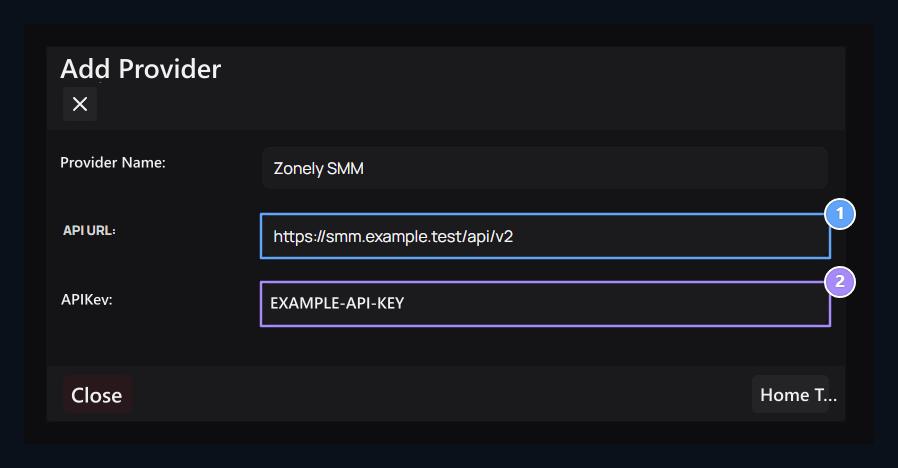
API address, API key

1. API address

Type the API address you receive from your provider.

2. API switch

Enter the key of your provider account.
Store → Service Providers → Add Providers open the way. Select a name. You receive from your provider account API URL and API Key enter and record values. Provider Transactions run the process of bringing/degrading services from the menu. Edit registration when connection information changes; re-restore services when service list changes. details Service Providers is in the guide.

Connect the product to the service

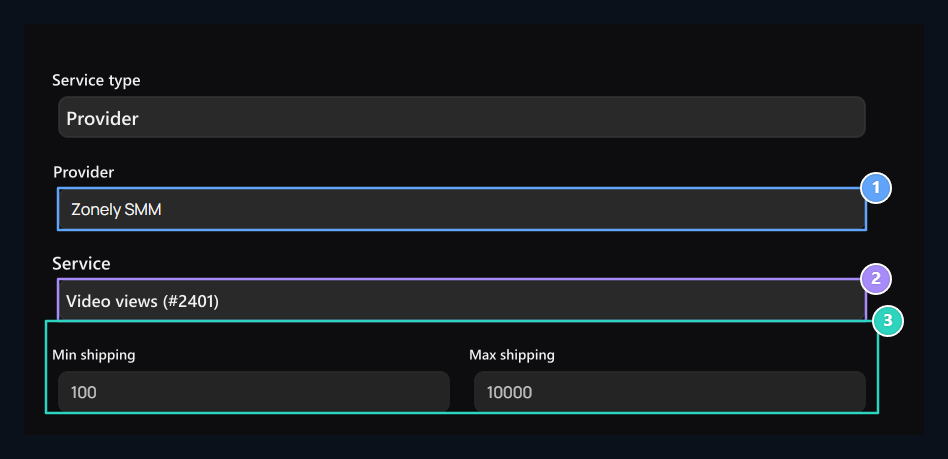
Provider, Service, Quantity limits

1. Provider

Select your service type Provider structure and panel.

2. Service

Select the service to be sold.

3. Quantity limits

Check the bottom and upper limits of the service.
Add product Prepare product name, category, description and visual on the screen. Service type in the field Provider Select. Set the provider and the service to be sold; compare the service number in similar names. Check the minimum and maximum quantities from the service. Complete price and discount conditions if you have. Publish Save with and check the service description and order areas in the store. All areas Adding SMM product is in the guide.

Follow the order

Orders Monitor the status of the order from the screen. Check the provider balance, service status and quantity limits in the unforeseen registration. Evaluate the provider’s result with local registration.