
 Home
 User Guide
 Developers
 Payment Gateways
 Integrations & Tools
 Site Usage
 Troubleshooting
Install and add ranking
Your Server PlaceholderAPI and ajLeaderboards Install plugins. Set the appetizer you want to include rankings and add ranking from the game or server console:Server console
Configure MySQL settings
To read the rankings of the web panel, ajLeaderboards should save data to MySQL. Stop the server and plug-in/milkerboards/config.yml open the file. Zonely panel Settings → Database Update configuration by taking your database link information from the section:plugins/ajLeaderboards/config.yml
ajlb_ determined as determined. update_interval determines how many seconds of data will be transferred to a database (recomposed: 60 seconds). Save the file and restart the server.
Set up season data link
Management panel Various → Seasons open the part. To create new season Add Season Press the button or edit a current season. Data Connection Match the ajLeaderboards MySQL table and the necessary columns on the tab: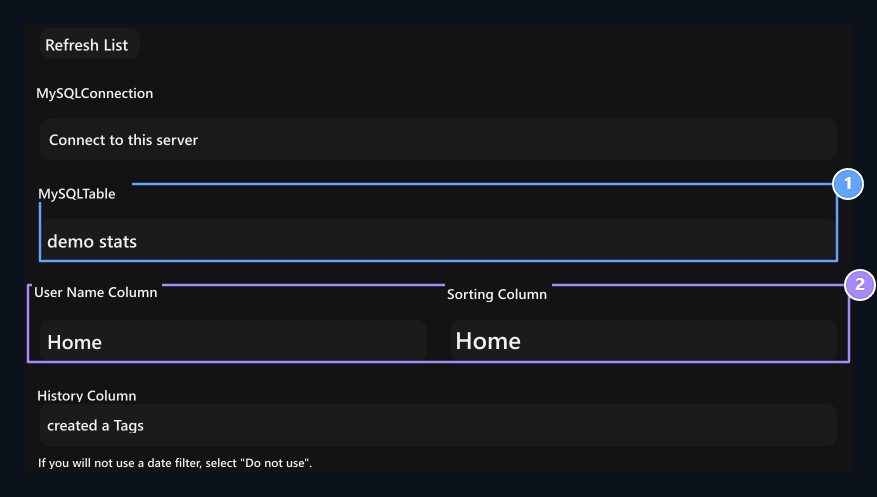
1. MySQL Table
Select the ranking table created by ajLeaderboards.
2. User and ranking
Match user name column and ranking score.
Make sure user names match user accounts on the site.
Optional: Season Ticket configuration
Season Ticket (Season Pass) is a optional feature that players can skip levels with points earned via ajLeaderboards and receive prizes. If you want to show only the ranking list, you can skip this step. To activate Season Ticket:- Season editing screen Season Ticket Open the tab.
- Activate Season Ticket Open the option.
- Progress Statistics Select the ranking column that you link from ajLeaderboards.
- Add Level Identify score targets (e.g. 50, 100, 250 points) and rewards (credit, case switch or server delivery commands).
Control and troubleshooting
- Points are not updated:
config.ymlinsideupdate_intervalCheck time and MySQL connection status. The plugin must be authorized to write to the database. - User Not Found: If AuthMe or nLogin are used on your server, make sure the account name on the site matches one-on-one with the username on the game.
- Sort seems blank:
ajlb_Check whether there is data on tables; players can get empty tables until they enter the server and create statistics.