
 Home
 User Guide
 Developers
 Payment Gateways
 Integrations & Tools
 Site Usage
 Troubleshooting
Service
ZonelyAfkBotApiService Get files and Service/ Switch to the folder. Use the file of your operating system for local startup:- Windows
- Linux
Windows · local


Edit service access
The first opening Service/.env file API_TOKEN, PANEL_USERNAME, PANEL_PASSWORD and PANEL_SESSION_SECRET Set values. The default main port of the service 8787.Prepare Zonely link
Addons → Minecraft AFK Bot settings API Mode Select. Same as the HTTP/HTTPS type, service address, port and .env file API Token enter the value.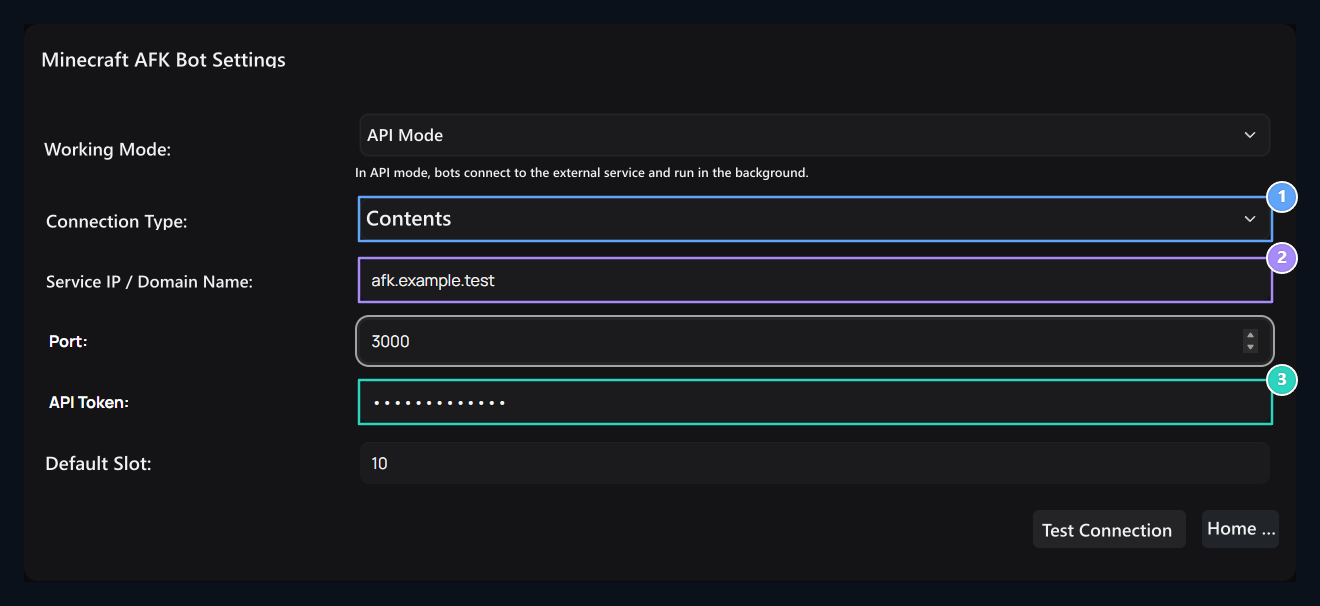
1. Connection Type
Select your service’s HTTP or HTTPS type.
2. Service IP/Domain Name
Enter the address and port of the AFK service.
3. API Token
Use the same token value with the service .env file.