
 Home
 User Guide
 Developers
 Payment Gateways
 Integrations & Tools
 Site Usage
 Troubleshooting
Select console infrastructure
Learn from your hosting or module document which module has been opened in your server. Basic server settings Servers/<server-name>/Server/Commands.dat is located under; remote console configuration depends on the module used. Rocket/LDM console Home is a text-based TCP service that makes verification with the command. For connection to be used in Zonely Source RCON A bridge or compatible module is required.Add compatible connection
Management panel Store → Servers open the part. Add new server or edit the corresponding record. Unturned registration RCON Select. Enter the accessible address, TCP port and verification password of the Source RCON service.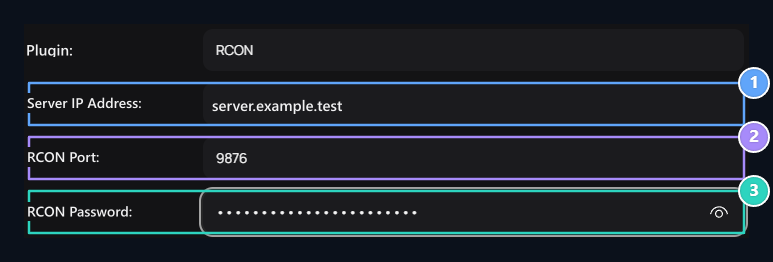
1. Server IP Address
Enter the counterness in your server configuration.
2. RCON Port
Enter the counterness in your server configuration.
3. RCON Password
Enter the counterness in your server configuration.