
 Home
 User Guide
 Developers
 Payment Gateways
 Integrations & Tools
 Site Usage
 Troubleshooting
Joint Structure and Zero Delay: Zonely’s main role system and SkinsRestorer tables are in common structure. This is a much more optimized system without extra table cost or an external relay server. The player is reflected in the role and authority defined from the site when entering the server directly into the game.
Install LuckPerms
From LuckPerms download page Get the file that fits your server platform. Dry the plugin and create the first set file. On the Bukkit plug-ins/LuckPerms/config.yml the file is used.Prepare MySQL storage
Zonely panel Settings → Database open the part. Get the address, port, name and access information of your own database. Integration Builder → LuckPerms You can get the connection draft from the section.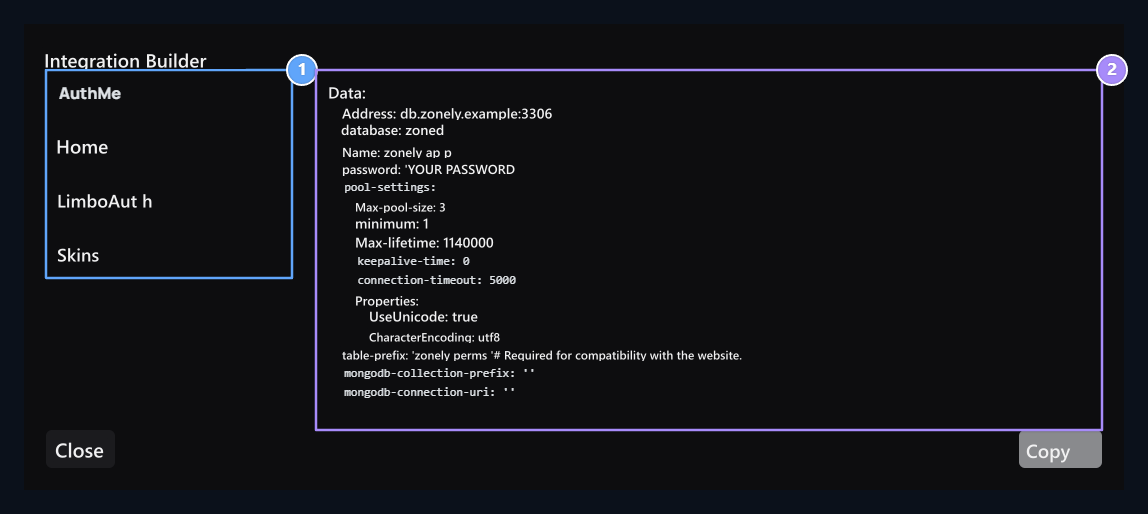
1. Select the plugin
Open the configuration draft of the plugin you will connect.
2. Ready-to-configure
Copy the partition produced by your own link.
plugins/LuckPerms/config.yml
Unleaded authorization and role assignment
You can directly export the role of in-game authorizations from console command or delivery without waiting.1. Connect to the game group with the ball
Zonely in the management panel: Users → Roller → Role Insert- Type role name (e.g..
VIP). - Game Authorization → Authorization Permissions add group nodes to the field (e.g..
group.vip). A same island on the LuckPerms sidevipgroup should be defined. - Role of permissions on the site Permits Select from the tab.
2. Set the duration of the role
Duration Select the type of validity of the authorization on the tab:- Unlimited: Defines permanent authorization.
- Limited: It defines automatic shield authorization after a certain time (e.g…
30d= 30 days,10m= 10 minutes).
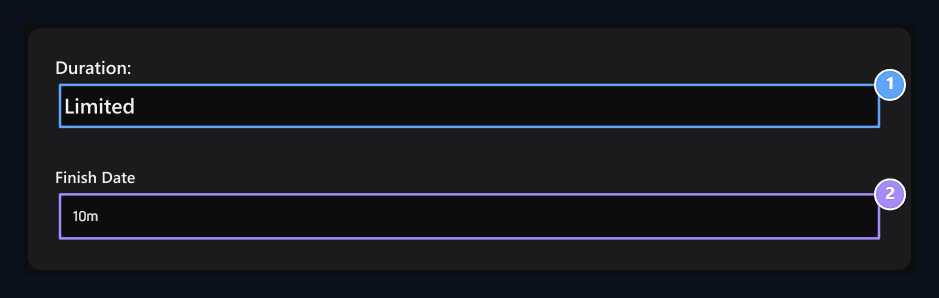
1. Time type
Select limited or unlimited role type.
2. Role time
Enter the validity time for limited authorization.
3. Connect to the user or store product
- Direct assignment to the user
- Automatic appointment with store product
Roller → Role Ver Enter the screen. Select the user name and the role you create. Give When you press the button, the authorization is written in the database instantly. If the player is in the game
sync-minutes In the period, the moment when the game is connected to the server is activated.4. Follow the remaining time
When you open user record on the roller page, you can view the remaining time and the date of the end of the clock icon next to the duration of the duration role. When the time expires, the system automatically terminates the role and in-game LuckPerms permissions.LuckPerms official source · Roles · Products · Connections and tools