
 Home
 User Guide
 Developers
 Payment Gateways
 Integrations & Tools
 Site Usage
 Troubleshooting
Prepare the plugin
AuthMe posts Get JAR file that fits your server version. plugs/ Put it in the folder and start the server in order to create the set file. Edit the configuration when the server is closed.Make Database Match
Zonely panel Settings → Database open the part. Get the address, port, name and access information of your own database. Integration Builder → AuthMe Copy linkage allowance from the section. Available plug-ins/AuthMe/config.yml in the file DataSource Edit the part.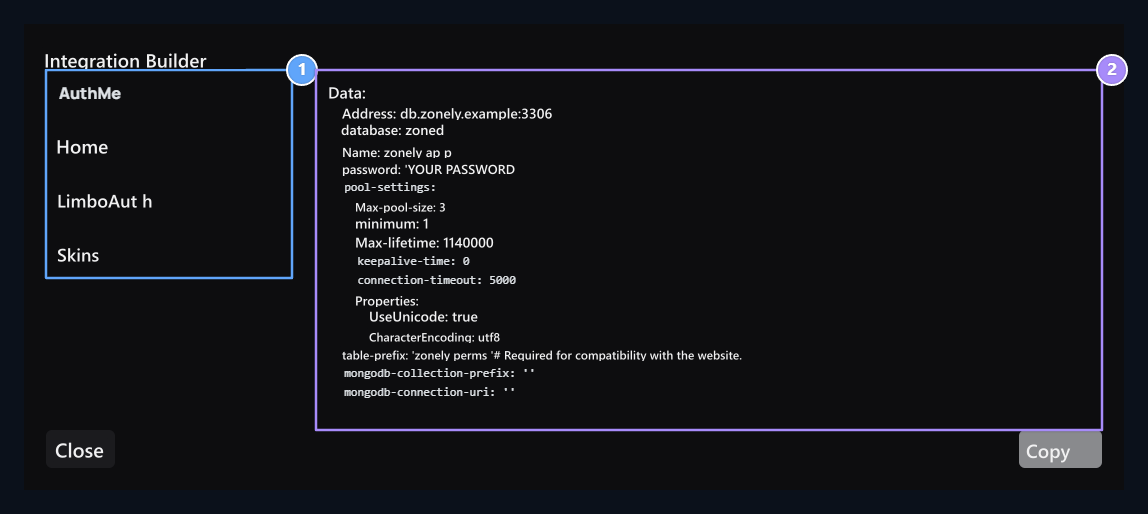
1. Select the plugin
Open the configuration draft of the plugin you will connect.
2. Ready-to-configure
Copy the partition produced by your own link.
plugins/AuthMe/config.yml · relevant section
Match the password method
Your site’s password encryption algorithm in AuthMe configuration passwordHash the setting should be the same one-on-one. From the management panel to make encryption type the same: Settings → System Settings → Cryptographic Encryption Enter the section and the algorithm that is suitable for your AuthMe configuration (e.g., BCRYPT or SHA256Select ) Alternatively edit the algorithm on your AuthMe file according to the active selection on the panel.Example for a site using BCRYPT
[!WARNING] The existing registered passwords are not automatically converted when the encryption algorithm is changed. On the game serverpasswordHashvalue on the siteKriptografik ŞifrelemeIf users are unmatched, users receive password error when logging in to the game.