
 Home
 User Guide
 Developers
 Payment Gateways
 Integrations & Tools
 Site Usage
 Troubleshooting

Prepare the payment method
Management panel Store → Payment Methods open the part. Add Payment Method prepare new registration with; Title type the name to show the user to the field. From the infrastructure list Manual Select. For example header Bank Transfer You can.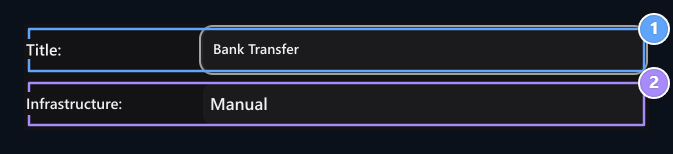
1. Title
Type the name the user will see in the payment options.
2. Payment infrastructure
Select the provider you want to connect.
Write account and description information
Content add bank name, account holder and IBAN information to the field. Specify what the user will write to the air description and how to reach you after payment.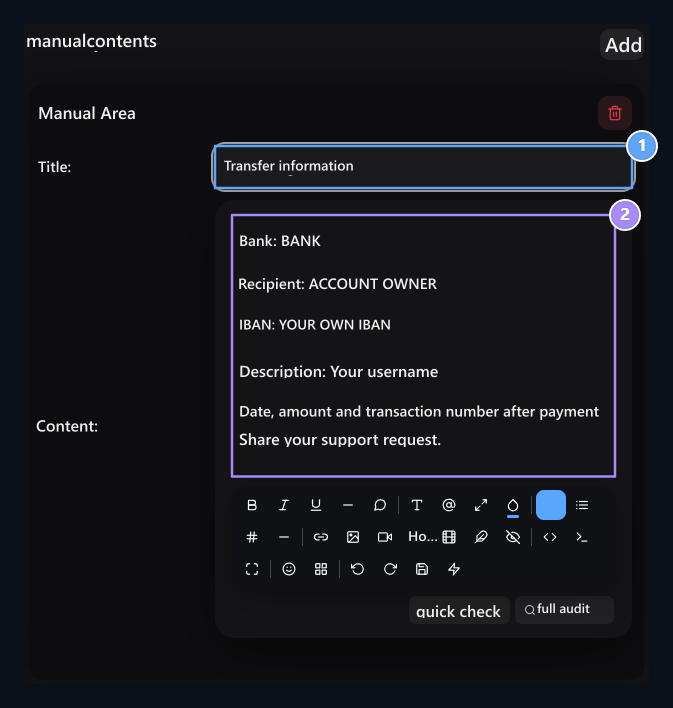
1. Information header
Type the header of the payment description.
2. Payment description
Specify the information and tracking channel to write to the account information, description field.
- Bank and receiver: Bank and account holder to pay.
- IBAN: The user will transfer the account.
- Description of the air: Information required to match the process with the user.
- Payment tracking: The date, amount and transaction number to be shared with the request for support.