
 Home
 User Guide
 Developers
 Payment Gateways
 Integrations & Tools
 Site Usage
 Troubleshooting

How to get PAT?
- Login to your Shopier account.
- Your Account Two-Step Verification Activate the feature.
- Menu Account Management → Personal Access Switch Enter the section.
- Create a new personal access switch and save it to a safe place.
Personal access switch is shown only at the time it is created. If you lose the key, you need to delete the old and create the new one. You don’t need to open the developer mode for your own account.
How does the payment system work?
When the user selects the payment method, the system automatically generates the payment product on Shopier and redirects the user to the Shopier payment page. The transaction is automatically verified when the payment is completed and the credit purchased is added instantly to the user’s account.Prepare Zonely record
Management panel Store → Payment Methods open the part. Add Payment Method prepare new registration with; Title type the name to show the user to the field. From the infrastructure list Shopier PAT Select.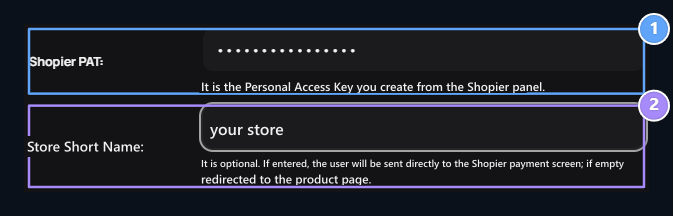
1. Shopier PAT
Enter Your Personal Access Switch from your Shopier panel.
2. Store Short Name
Enter the short name on your Shopier shop connection (optional).
What You Need to Know
- You do not need to make the old order notice or OSB setting.
- The notification link is created automatically by the system.
- Do not share your PAT key with anyone; do not add support request, Discord channel or screenshot.
- Shopier needs to be appropriate and active to sell your account.
- It is not enough to upload balance only to return to the payment page; the payment is verified via Shopier.