
 Home
 User Guide
 Developers
 Payment Gateways
 Integrations & Tools
 Site Usage
 Troubleshooting

Get Provider information
iyzico in the vendor panel Settings → Company Settings Open API information in the section. API Key and Secret Key Get values from the same account.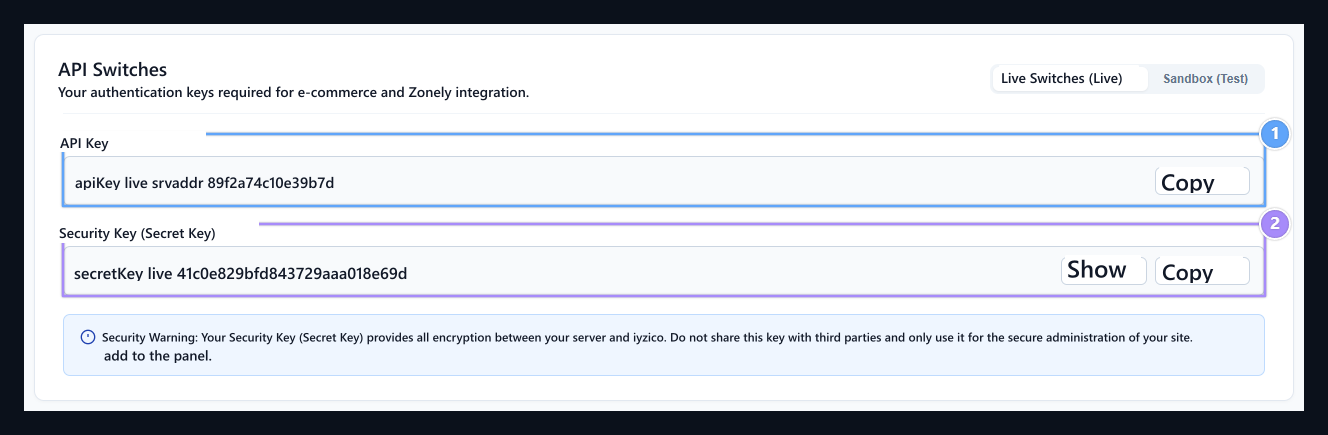
1. API Switch (API Key)
Copy the overall ID key on your store’s iyzico.
2. Security Key (Secret Key)
Transfer the payment and balance transactions to Zonely panel by copying the hidden key that encrypts.
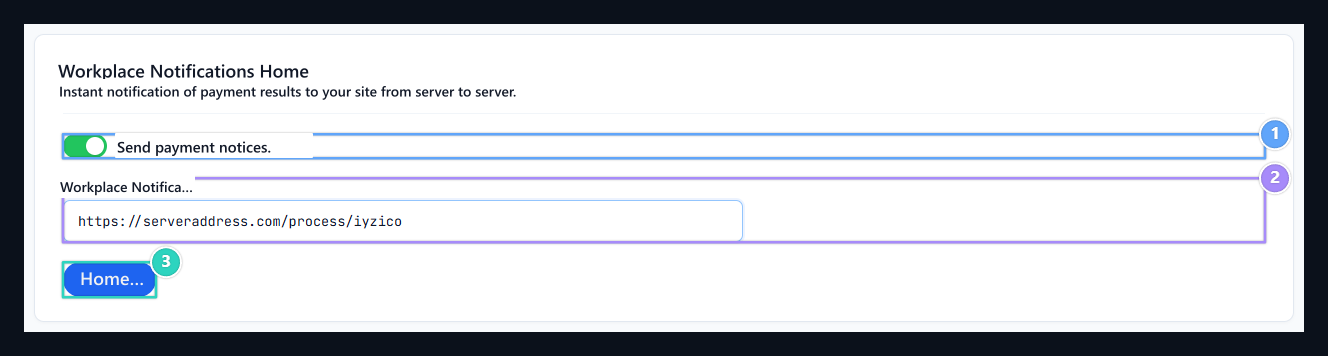
1. Open Payment Notifications
To activate the notification to your server of the payment results.
2. Workplace Notifications URL
Enter all the Callback URL address in your Zonely registration.
3. Save
Click Save button to apply changes.
Prepare Zonely record
Management panel Store → Payment Methods open the part. Add Payment Method prepare new registration with; Title type the name to show the user to the field. From the infrastructure list Iyzico Select.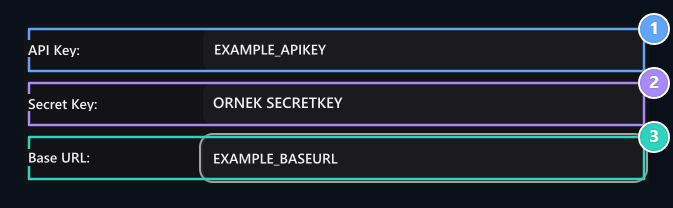
1. API Switch
Enter the API Key information on the same provider account.
2. Hidden Key
Enter the Hidden Key information on the same provider account.
3. Basic URL
Enter the Basic URL information on the same provider account.