
Paymentwall logo Prepare project keys, widget ID and pingback settings.

Prepare account details

Open project on your Paymentwall account. Project Settings Project Key and Secret Key values in the section, Widgets Get the widget ID you will use from the section. Project Key, Secret Key

1. Project Key

Enter the key to this project in Zonely Project Key field.

2. Secret Key

Copy the hidden key of the same project.
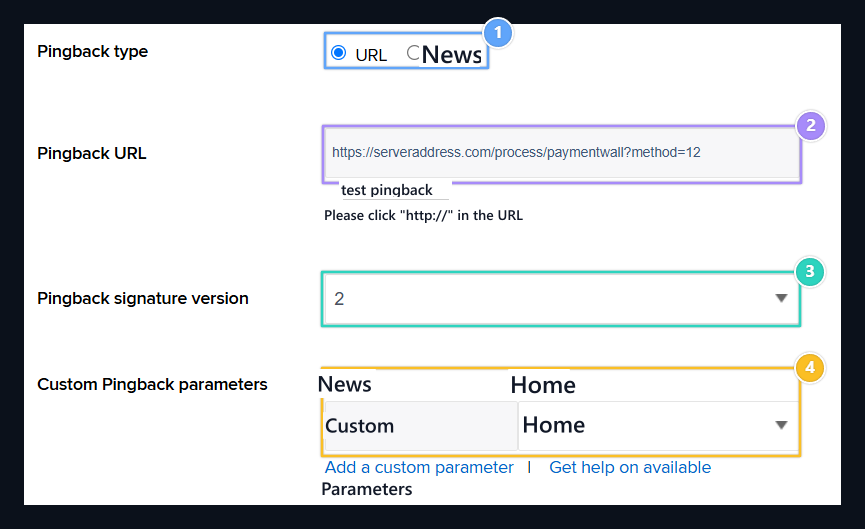
Pingback type, Pingback URL, Signature version, custom/KEN

1. Pingback type

Select the type of notification as URL.

2. Pingback URL

Enter the full Callback URL address of the saved Zonely method.

3. Signature version

Select 2 or 3 signatures that Zonely supports the receiver.

4. custom/OY

Name: custom, Value: OWN. Save this line with project settings.

Create a payment record

Management panel Store → Payment Methods open the part. Add Payment Method prepare new registration with; Title type the name to show the user to the field. From the infrastructure list Paymentwall Select and fill in the following information.

Notification and environment settings

Project Pingback URL Type Callback URL value from the domain. Special parameter used in Zonely connection Name: custom, Value: BEH Protect as. Match the Pingback signature version that the link uses the set. After you have logged in Edit Reopen with. Callback URL Get full address of this slip with the copy button on the line. Transfer this address, including the notification field in the provider, query parameters.

Payment tracking

Transaction number, amount and payment status Store → Payments Follow the section. Zonely registration should show the same operation with the provider registration. Check the product delivery from the order. Paymentwall document · Payment records and history · Payment methods